#100DaysofYARA 2024 – Day 71 – GAZPROM Ransomware

The GAZPROM ransomware first appeared in early 2023 and seems to share code with Conti ransomware. This rule matches strings found in samples of the Windows variant:

rule MAL_GAZPROM_strings {
	meta:
		description = "Matches strings found in Windows samples of GAZPROM ransomware."
		last_modified = "2024-03-11"
		author = "@petermstewart"
		DaysofYara = "71/100"
		sha256 = "5d61fcaa5ca55575eb82df8b87ab8d0a1d08676fd2085d4b7c91f4b16898d2f1"

	strings:
		$a = ".GAZPROM" wide
		$b1 = "Your files has been encrypted!"
		$b2 = "Need restore? Contact us:"
		$b3 = "Telegram @gazpromlock"
		$b4 = "Dont use any third party software for restoring your data!"
		$b5 = "Do not modify and rename encrypted files!"
		$b6 = "Decryption your files with the help of third parties may cause increased price."
		$b7 = "They add their fee to our and they usually fail or you can become a victim of a scam."
		$b8 = "We guarantee complete anonymity and can provide you with proof and"
		$b9 = "guaranties from our side and our best specialists make everything for restoring"
		$b10 = "but please should not interfere without us."
		$b11 = "If you dont contact us within 24 hours from encrypt your files - price will be higher."
		$b12 = "Your decrypt key:"

	condition:
		filesize > 200KB and filesize < 350KB and
		uint16(0) == 0x5a4d and
		$a and
		10 of ($b*)
}

Find the rest of my 100DaysofYARA posts here, and the rules themselves on my Github repository.
#100DaysofYARA 2024 – Day 70 – Advanced IP Scanner

Advanced IP Scanner is another legitimate tool commonly abused by threat actors. This rule matches strings found in the installer binary:

rule PUP_AdvancedIPScanner_strings {
	meta:
		description = "Matches strings found in the Advanced IP Scanner installer, often abused by malicious actors."
		last_modified = "2024-03-10"
		author = "@petermstewart"
		DaysofYara = "70/100"
		sha256 = "26d5748ffe6bd95e3fee6ce184d388a1a681006dc23a0f08d53c083c593c193b"

	strings:
		$a1 = "This installer contains the logic and data to install Advanced IP Scanner"
		$a2 = "www.advanced-ip-scanner.com/link.php?"
		$a3 = "advanced ip scanner; install; network scan; ip scan; LAN"

	condition:
		uint16(0) == 0x5a4d and
		all of them
}

Find the rest of my 100DaysofYARA posts here, and the rules themselves on my Github repository.

#100DaysofYARA 2024 – Day 69 – PingRAT Server

PingRAT is a relatively simple open-source RAT which uses ICMP to pass through firewalls. This rule matches strings found in the PingRAT server:

rule MAL_PingRAT_server_strings {
    meta:
        description = "Matches strings found in the PingRAT server binary and source code."
        last_modified = "2024-03-09"
        author = "@petermstewart"
        DaysofYara = "69/100"
        sha256 = "81070ba18e6841ee7ec44b00bd33e8a44c8c1af553743eebcb0d44b47130b677"
        ref = "https://github.com/umutcamliyurt/PingRAT"

    strings:
        $a1 = "Listener (virtual) Network Interface (e.g. eth0)"
        $a2 = "Destination IP address"
        $a3 = "Please provide both interface and destination IP address."
        $a4 = "[+] ICMP C2 started!"
        $a5 = "[+] Command sent to the client:"
        $a6 = "[+] Stopping ICMP C2..."
        $b1 = "golang.org/x/net/icmp"
        $b2 = "golang.org/x/net/ipv4"
        $b3 = "os/signal"

    condition:
        all of them
}

Find the rest of my 100DaysofYARA posts here, and the rules themselves on my Github repository.

#100DaysofYARA 2024 – Day 68 – PingRAT Client

PingRAT is a relatively simple open-source RAT which uses ICMP to pass through firewalls. This rule matches strings found in the PingRAT client:

rule MAL_PingRAT_client_strings {
    meta:
        description = "Matches strings found in the PingRAT client binary and source code."
        last_modified = "2024-03-08"
        author = "@petermstewart"
        DaysofYara = "68/100"
        sha256 = "51bcb9d9b2e3d8292d0666df573e1a737cc565c0e317ba18cb57bd3164daa4bf"
        ref = "https://github.com/umutcamliyurt/PingRAT"

    strings:
        $a1 = "(Virtual) Network Interface (e.g., eth0)"
        $a2 = "Destination IP address"
        $a3 = "[+] ICMP listener started!"
        $b1 = "golang.org/x/net/icmp"
        $b2 = "golang.org/x/net/ipv4"
        $b3 = "os/exec"

    condition:
        all of them
}

Find the rest of my 100DaysofYARA posts here, and the rules themselves on my Github repository.

#100DaysofYARA 2024 – Day 67 – Hunting for Sensitive Documents

There was a point to yesterday’s utility rule; we can use it to hunt for documents that perhaps shouldn’t be on public sandboxes! This rule focuses on the Traffic Light Protocol markings, but could be adapted to match any other content.

rule HUNT_PDF_contains_TLP_marking {
    meta:
        description = "Finds PDF files which contain TLP marking strings."
        last_modified = "2024-03-07"
        author = "@petermstewart"
        DaysofYara = "67/100"
        ref = "https://www.cisa.gov/news-events/news/traffic-light-protocol-tlp-definitions-and-usage"

    strings:
        $a = "TLP:RED" ascii wide fullword
        $b = "TLP:AMBER+STRICT" ascii wide fullword
        $c = "TLP:AMBER" ascii wide fullword
        $d = "TLP:GREEN" ascii wide fullword
        $e = "TLP:CLEAR" ascii wide fullword

    condition:
        uint32(0) == 0x46445025 and
        any of them
}

Find the rest of my 100DaysofYARA posts here, and the rules themselves on my Github repository.

#100DaysofYARA 2024 – Day 66 – PDF File Header

Just a simple utility rule today; matching PDF documents based on the file header:

rule file_pdf_header {
    meta:
        description = "Finds Portable Document Format (.pdf) files"
        last_modified = "2024-03-06"
        author = "@petermstewart"
        DaysofYara = "66/100"
        ref = "https://en.wikipedia.org/wiki/PDF"

    condition:
        uint32(0) == 0x46445025
}

Find the rest of my 100DaysofYARA posts here, and the rules themselves on my Github repository.

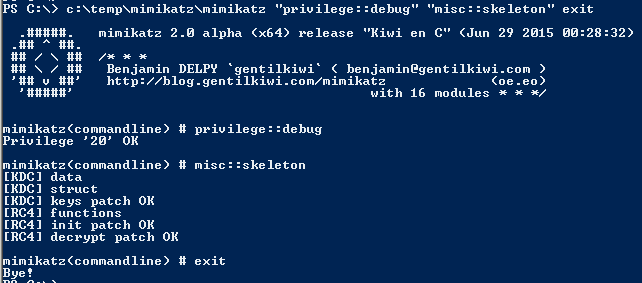
#100DaysofYARA 2024 – Day 65 – Mimikatz ASCII Art

Inspired by techspence’s collection of hacker ASCII art, this rule matches the ASCII logo embedded in Mimikatz binaries.

rule HUNT_Mimikatz_ascii_art {
	meta:
		description = "Matches ascii art Mimikatz logo."
		last_modified = "2024-03-05"
		author = "@petermstewart"
		DaysofYara = "65/100"
		sha256 = "912018ab3c6b16b39ee84f17745ff0c80a33cee241013ec35d0281e40c0658d9"

	strings:
		$a1 = ".#####." ascii wide
		$a2 = ".## ^ ##."  ascii wide
		$a3 = "## / \\ ##" ascii wide
		$a4 = "## \\ / ##" ascii wide
		$a5 = "'## v ##'" ascii wide
		$a6 = "'#####'" ascii wide

	condition:
		all of them
}

Find the rest of my 100DaysofYARA posts here, and the rules themselves on my Github repository.

#100DaysofYARA 2024 – Day 64 – Atera Agent

Rounding out this little series on Remote Management and Monitoring tools is Atera Agent. Just like ScreenConnect and AnyDesk, Atera Agent has also been abused by malicious actors.

Today’s rule matches strings found in the Atera Agent MSI installer package:

rule PUP_RMM_AteraAgent_msi {
	meta:
		description = "Matches strings found in Atera Agent remote management tool installer, often abused for unauthorised access."
		last_modified = "2024-03-04"
		author = "@petermstewart"
		DaysofYara = "64/100"
		sha256 = "91d9c73b804aae60057aa93f4296d39ec32a01fe8201f9b73f979d9f9e4aea8b"

	strings:
		$magic = { d0 cf 11 e0 a1 b1 1a e1 }
		$clsid = { 84 10 0c 00 00 00 00 00 c0 00 00 00 00 00 00 46 }
		$a1 = "AteraAgent"
		$a2 = "This installer database contains the logic and data required to install AteraAgent."

	condition:
		$magic at 0 and
		all of them
}

Find the rest of my 100DaysofYARA posts here, and the rules themselves on my Github repository.

#100DaysofYARA 2024 – Day 63 – AnyDesk

AnyDesk is another legitimate Remote Management and Monitoring tool also abused as a secondary C2 by threat actors, including at least two publicly-reported intrusions linked to the BumbleBee loader malware which I covered at the end of January:

AnyDesk also suffered a pretty serious breach a few weeks ago resulting in the revocation of their code-signing certificate, so maybe treat AnyDesk binaries with a bit more suspicion now.

rule PUP_RMM_AnyDesk_exe {
	meta:
		description = "Matches AnyDesk remote management tool, often abused for unauthorised access."
		last_modified = "2024-03-03"
		author = "@petermstewart"
		DaysofYara = "63/100"
		sha256 = "5beab9f13976d174825f9caeedd64a611e988c69f76e63465ed10c014de4392a"
		sha256 = "7a719cd40db3cf7ed1e4b0d72711d5eca5014c507bba029b372ade8ca3682d70"

	strings:
		$pdb = "C:\\Buildbot\\ad-windows-32\\build\\release\\app-32\\win_loader\\AnyDesk.pdb"
		$a1 = "my.anydesk.com"
		$a2 = "AnyDesk Software GmbH" wide

	condition:
		uint16(0)==0x5a4d and
		all of them
}

Find the rest of my 100DaysofYARA posts here, and the rules themselves on my Github repository.

#100DaysofYARA 2024 – Day 62 – ScreenConnect

ScreenConnect is a legitimate Remote Management and Monitoring tool which has been abused to act as a C2 mechanism by threat actors, including at least one HIVE SPIDER affiliate. If that’s not enough, the ScreenConnect server was found to suffer from a trivially exploited authentication bypass vulnerability in February 2024.

This rule matches strings found in the ScreenConnect MSI package, commonly used to install the application:

rule PUP_RMM_ScreenConnect_msi {
	meta:
		description = "Matches strings found in ScreenConnect MSI packages, often abused for unauthorised access."
		last_modified = "2024-03-02"
		author = "@petermstewart"
		DaysofYara = "62/100"
		sha256 = "80b6ec0babee522290588e324026f7c16e3de9d178b9e846ae976ab432058ce7"
		sha256 = "f8c2b122da9c9b217eada5a1e5fde92678925f1bb2ea847253538ffda274f0b9"

	strings:
		$magic = { d0 cf 11 e0 a1 b1 1a e1 }
		$clsid = { 84 10 0c 00 00 00 00 00 c0 00 00 00 00 00 00 46 }
		$a1 = "ScreenConnect.Client.dll"
		$a2 = "ScreenConnect.WindowsClient.exe"
		$a3 = "Share My Desktop"
		$a4 = "Grab a still image of the remote machine desktop"

	condition:
		$magic at 0 and
		all of them
}

While researching ScreenConnect I also wrote a utility rule to detect MSI installers:

rule file_msi {
    meta:
        description = "Finds Microsoft Installer (.msi) files"
        last_modified = "2024-03-02"
        author = "@petermstewart"
        DaysofYara = "62/100"

    strings:
        $magic = { d0 cf 11 e0 a1 b1 1a e1 }
        $clsid = { 84 10 0c 00 00 00 00 00 c0 00 00 00 00 00 00 46 }
        
    condition:
        $magic at 0 and
        $clsid
}

Find the rest of my 100DaysofYARA posts here, and the rules themselves on my Github repository.